
What is the Taxonomy?
What is the Adaptive Taxonomy?
Enterpret’s Adaptive Taxonomy groups customer feedback by product area and by what customers say about it. It uses your product context and has five levels.
What Adaptive Taxonomy does
Enterpret uses your taxonomy to classify incoming feedback. Where configured, Dynamic Taxonomy can add themes and sub-themes.
To check a classification, open the taxonomy path and read the feedback behind it. Prepare a correction if needed.
Understanding the Taxonomy Structure
A complete taxonomy path has five levels: L1 → L2 → L3 → Theme → Sub-theme. The first three levels describe product areas; the last two capture what customers say about those areas. Themes can be linked to more than one product path, so the same theme may appear under multiple areas. Categories are an attribute of feedback themes, not a sixth level.
1. Keywords (L1/L2/L3) - What the feedback is about
Keywords represent aspects of your product organized in three hierarchical levels, from broad to specific.
2. Themes and sub-themes group related feedback
Themes group related feedback. Sub-themes describe specific versions of the same issue or request.
Keywords: Three-Level Hierarchy
Keywords organize your product structure into three levels of specificity:
Level 1 (L1): High-level features or feature groups. Broad product areas or major functionalities.
Level 2 (L2): Features or feature aspects. More focused sections within the high-level feature.
Level 3 (L3): Specific Sub-features or Actions. Precise functionalities or specific user actions.
Example: Ridesharing Service Keywords
Level 1: Booking
├─ Level 2: Ride Scheduling
│  ├─ Level 3: Schedule future rides
│  └─ Level 3: Modify scheduled rides
└─ Level 2: Driver Assignment
   ├─ Level 3: Driver matching
   └─ Level 3: Driver arrival time

Level 1: Payment
├─ Level 2: Payment Methods
│  ├─ Level 3: Add credit card
│  └─ Level 3: Payment method errors
└─ Level 2: Billing
   ├─ Level 3: Receipt generation
   └─ Level 3: Refund processing
Keyword Components
Each Keyword consists of:
Name: How the Keyword is recognized across Enterpret
Description: Details that help the system understand and predict it reliably
Level: The hierarchical level it belongs to (L1, L2, or L3)
Special Keyword Types
Not Specified: Captures feedback that mentions only the parent concept without additional detail.
Example: Feedback says "I love the playback feature" (mentions Playback but no L2/L3 specifics) → tagged as "Playback > Not Specified"
Misc (Miscellaneous): Contains feedback with specific patterns that are not covered by an existing child Keyword.
Example: Feedback mentions a specific playback scenario that is not covered by an existing L3 Keyword → tagged as "Playback > Offline Listening > Misc"
How themes and sub-themes are organized
Themes group feedback that makes a similar request, reports a similar problem, or gives similar praise. They replace Reasons in the older taxonomy.
Sub-themes describe specific variations within a Theme.
Theme & Sub-theme Components
Each consists of:
Name: How it's identified across Enterpret
Category: Maps to one specific Category (Help, Improvement, Complaint, Praise)
Relationships
Theme → Sub-theme (One-to-Many):
Each Theme can have multiple Sub-themes
Each Sub-theme belongs to exactly one Theme
Theme ↔ Keyword (Many-to-Many):
A Theme must map to at least one Keyword but can map to multiple
A Keyword can have multiple Themes associated with it
Sub-theme ↔ Keyword (Many-to-Many via Theme):
A sub-theme belongs to its parent Theme. Specific sub-themes can apply to only the relevant keyword paths of a multi-path Theme; General and Miscellaneous catch-alls cover all of that Theme’s parent paths.
Special Sub-theme Types
General Sub-theme: A catch-all for feedback that matches the Theme but contains no additional specificity.
Example: Feedback says "I had a billing issue" without details → tagged as "Billing Problems > General"
Misc Sub-theme:
Captures feedback with specific patterns that are not covered by an existing Sub-theme.
Categories
Categories describe the intent of customer feedback.
Help: The user is asking for assistance or guidance
Improvement: The user is suggesting new features or modifications to existing ones
Complaint: The user is expressing dissatisfaction or highlighting issues
Praise: The user is giving positive feedback or praising your product or service
Example: classify a refund request
Customer Feedback: "I deactivated my account, but I'm still being charged. I just wanted to make a few videos. I'm so frustrated and can't get anyone on the phone! Please give me a refund."
Enterpret identifies:
Keywords (What it's about):
L1: Account
L1: Payment → L2: Billing → L3: Refunds
Themes and sub-themes
Theme: Issues with unexpected charges → Sub-theme: Refund request to unexpected charge post account deactivation → Category: Complaint
Theme: Issues with Support availability → Sub-theme: Frustration with no response on phone support → Category: Complaint
The mention of Videos gives context for the refund request. Check predictions against the original feedback before relying on them.
The Taxonomy page
Overview
Open the Taxonomy page to review how keywords, themes, and sub-themes are organized.
See L1/L2/L3 Keyword relationships at a glance
Understand Theme and Sub-theme mappings
Track how taxonomy evolves over time
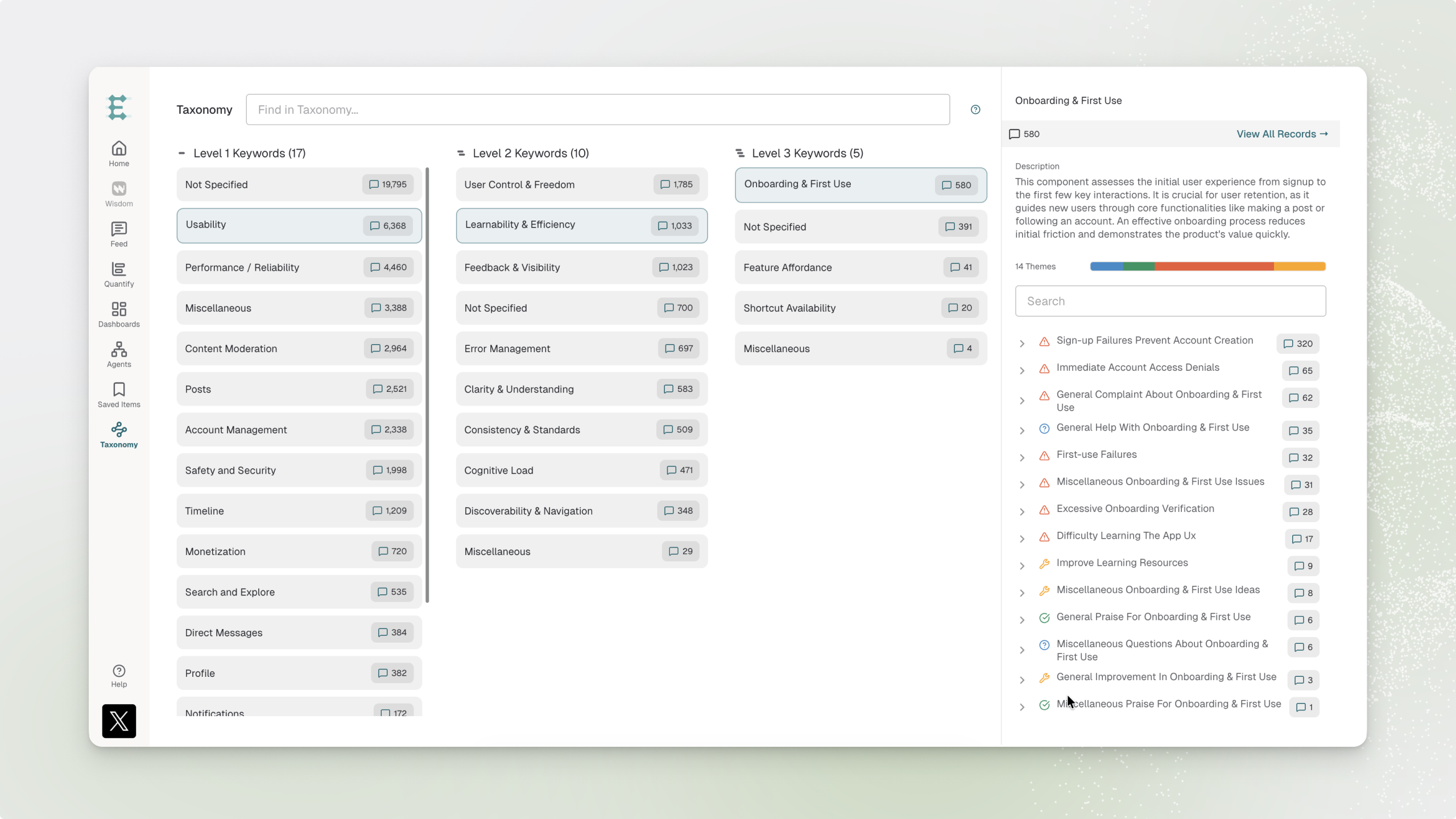
This screenshot shows an earlier Taxonomy layout.
Why can’t I see General or Miscellaneous in Taxonomy?
General and Miscellaneous are system-generated keywords. The standard Taxonomy view hides them. Enterpret still uses them to classify feedback.
If you have taxonomy edit access, select Edit Taxonomy. In the keyword tree beside Enterpret Agent, expand the parent keyword to see its hidden entries. You can inspect these entries before preparing or publishing edits.
Managing Your Taxonomy
In Enterpret Agent, you can prepare these changes:
Create: Add new Keywords, Themes, or Subthemes
Edit: Modify names, descriptions, and mappings
Move: Move keyword nodes across the hierarchy
Merge: Combine Themes and Subthemes
Archive: Remove outdated taxonomy items
Manage taxonomy with Enterpret Agent
From the Taxonomy page, select Edit Taxonomy to open Enterpret Agent. Describe what you want to understand or change, then review the Agent’s findings and prepared changes. Prepared changes are saved for your user and do not affect the live taxonomy until you publish them. For the complete workflow, including reviewing changes, publishing, and historical coverage, see Taxonomy Management.
Taxonomy Predictions in the Feedback Drawer
The feedback drawer groups predictions by Keyword path and shows:
The full path from L1 → L2 → L3
Associated Themes and Sub-themes
Category classifications
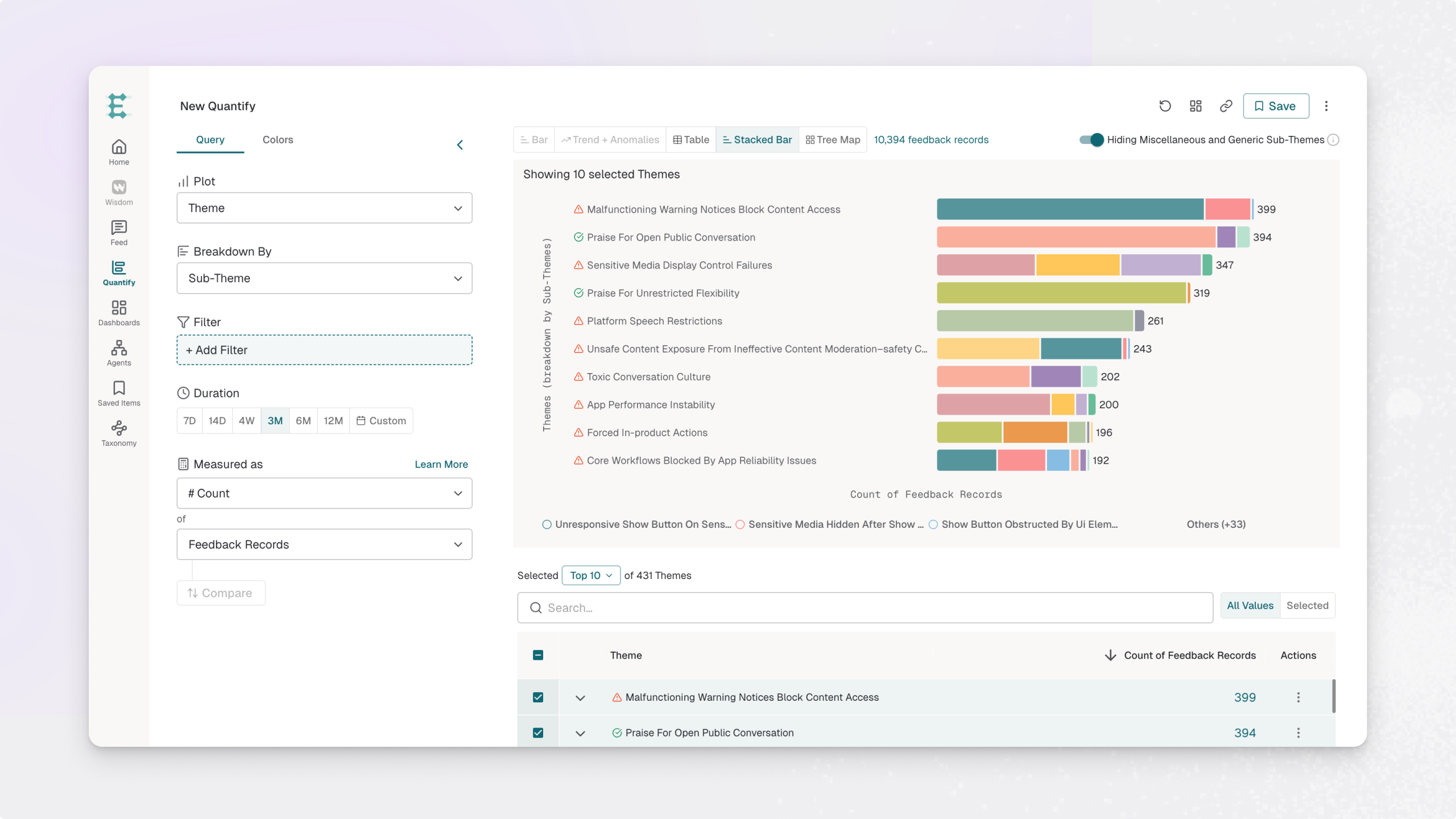
Keyword, Themes and Sub-Themes in Quantify
Plot or Breakdown by Keywords or Themes / Sub-Themes
Plot or breakdown by L1/L2/L3 keyword nodes or Themes and Sub-Themes with visual path selection
Deprecated Filters:
Old "Keywords" filter (replaced by hierarchical Keyword filter)
Old "Reasons" filter (replaced by Themes/Sub-themes filter)
Getting Started with Adaptive Taxonomy
Your initial Adaptive Taxonomy can use business context and feedback, including resources such as:
Your existing Tracked Keywords
Knowledge base resources (Help Center, changelog, documentation)
Your product’s business context
After setup, you can inspect and correct taxonomy paths and see how new feedback is classified.
Questions? Contact your Enterpret Customer Success team for help reviewing or updating your taxonomy.