
Connect YouTube videos and comments
In this article
In this article group
- Amazon Connect
- Apple App Store
- Census Integration
- Connect Plain to Enterpret
- Decagon Integration
- Discord
- Discourse Integration
- Email Integration
- Facebook Pages Integration
- Fathom Integration
- File Upload: CSV data on Enterpret
- Freshchat
- Freshdesk
- Front
- G2
- Gainsight Communities Integration
- GitHub Issues Integration
- Gong Integration
- Google My Business Integration
- Google Play Store
- Grain
- Granola Integration
- Import HubSpot feedback
- Instagram Comments Integration
- Intercom
- Kustomer
- Livechat Integration
- Momentive (Formerly Survey Monkey)
- Pylon integration
- Qualtrics
- Refiner Integration
- Salesforce
- SFTP Integration
- Slack feedback ingestion: setup and troubleshooting
- Snowflake
- Sprig Integration
- Stella Connect
- TikTok Integration
- Trustpilot Integration
- Typeform
- X (formerly Twitter) Integration
- Zendesk Chat
- Zendesk Support
- Import Zoho Desk support tickets
- Zoom Integration
- Zapier Integration
- Reddit Search (UGC)
- Wispr Flow integration
Use the YouTube feedback integration to collect eligible videos, comments, replies, and available transcripts as feedback. Include videos from your channel, discover public videos using keywords, include other channels, or combine these scopes.
Choose what to collect
Your videos: Enter your YouTube channel to collect eligible videos without requiring a keyword match.
Videos about your product: Add Search keywords to discover matching public videos. Optionally set a minimum view count using Skip videos under.
Channels you always want in: Add channels whose eligible videos you want to include without requiring a keyword match.
Add at least one channel or keyword. You can combine the sections in one integration. The minimum view setting applies to all configured scopes.
Before you begin
You need an Enterpret account with permission to manage integrations. Prepare a YouTube channel URL, @handle, or channel ID for any channel you want to include, and choose any keywords you want to search.
No Google sign-in is required for this setup. Enterpret uses the channel references and search scope you provide. Only content available through YouTube and eligible under your integration settings can be collected. Videos with comments disabled cannot supply comments.
Connect YouTube
In Enterpret, open Integrations and select New Integration.
Search for YouTube and open its setup form. Choose Feedback Integration if prompted.
To include your channel, enter its URL,
@handle, or channel ID in Your YouTube channel.To discover videos by topic, add terms under Search keywords. Press Enter or select Add keyword for each term. You can add up to 20 keywords.
If useful, enter a whole number in Skip videos under to exclude videos below that view count.
To include other channels regardless of keyword matches, add them under Always-include channels. Enter a channel URL,
@handle, or channel ID. You can add up to 25 channels.Complete the feedback description requested by the form and select Connect. Review the integration and its status in Integrations.
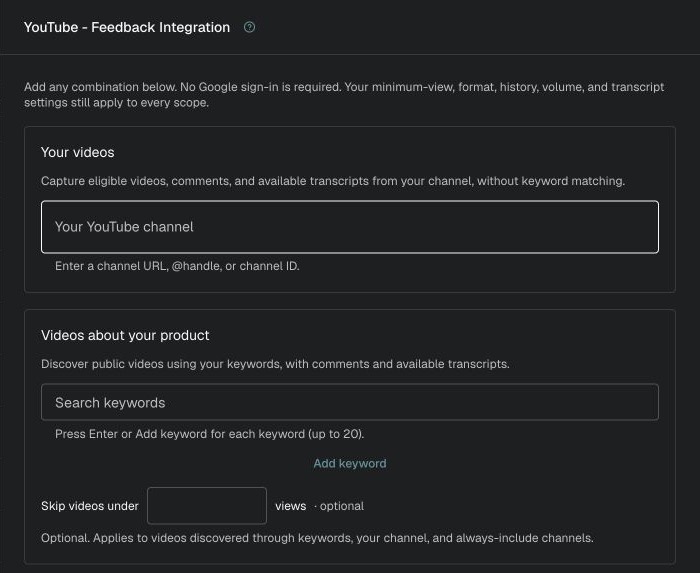
Choose your channel, search keywords, and an optional minimum view count.
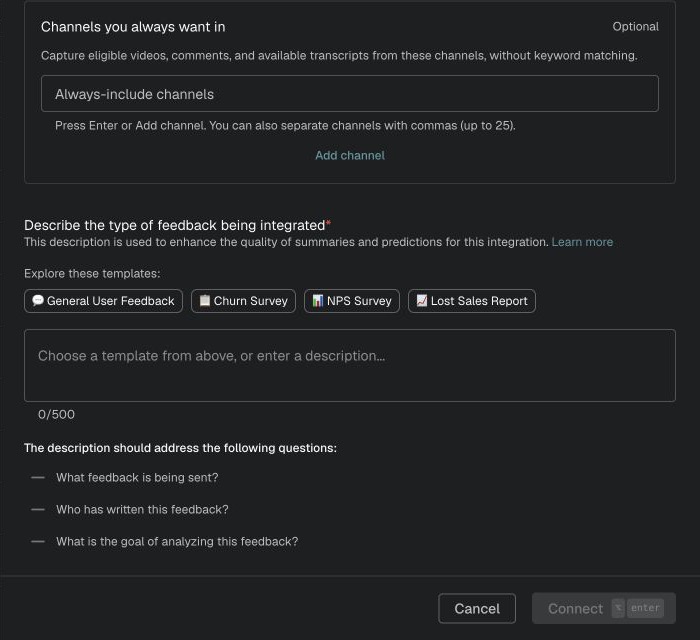
Add any always-include channels, describe the feedback, then select Connect.
What Enterpret imports
For eligible videos, Enterpret can bring in video context, published comments and replies, and available transcripts. Comments and replies retain conversation context so you can investigate themes and return to the source video.
The default initial discovery window is 90 days based on when a video was published. It is not a 90-day cutoff on the dates of comments left on an eligible video. Enterpret also revisits tracked videos for later comments and replies. Syncing is periodic; large volumes, YouTube API availability, and processing limits can delay or limit coverage.
The current collection defaults include Shorts, exclude live streams, and enable transcript generation for eligible videos. Transcript availability depends on the video and processing. Connecting the integration does not guarantee a transcript for every video.
Troubleshooting
The form rejects a channel
Use a YouTube channel URL, @handle, or channel ID. A video URL is not a channel reference.
A video is missing
Check that it falls within the initial video publication window and meets the minimum view and other collection settings. For keyword discovery, check that your terms can find the video. YouTube search availability and collection limits can also affect results.
Comments or replies are missing
Confirm that comments are enabled and visible on YouTube, then allow time for the next sync. Older videos and high volume may receive less ongoing coverage. Contact Enterpret Support with the video URL if feedback is still missing.
A transcript is missing
Transcripts are generated only when a video is eligible and processing succeeds. Contact Enterpret Support with the video URL if you expected one.
For help reviewing a missing video, comment, or transcript, contact support@enterpret.com and include the source URL.
Analyze this feedback with Enterpret Agent
Once this integration's feedback is available in Enterpret, use Enterpret Agent to investigate themes, summarize customer requests, and prepare reports. Specify this source and the reporting period in your request. For daily reports, weekly digests, and recurring reporting, configure scheduled Agent automations with Slack or email delivery.
This guide covers feedback ingestion. Agent connectors are a separate setup for reading external context or taking supported actions in other tools; connecting a feedback source does not automatically authorize those actions.