
Trustpilot Integration
Overview
Connect Trustpilot to analyze service reviews for your business and product reviews for selected SKUs.
What Data Gets Ingested
The Trustpilot integration captures two types of reviews:
Service Reviews (Business-Level)
These are general reviews about your company's overall service, delivery, support, and customer experience.
Captured data includes:
Field | Description | Example |
Review Title | Headline the customer wrote | "Great experience!" |
Review Text | Full review content | "Fast shipping and excellent customer service..." |
Star Rating | 1-5 star rating | ⭐⭐⭐⭐⭐ |
Verification Status | Whether the review is verified | Verified / Unverified |
Created Date | When the review was written | 2025-01-15 |
Experienced Date | When the customer's experience occurred | 2025-01-10 |
Product Reviews (SKU-Specific)
These are reviews tied to specific products you sell, identified by SKU.
Captured data includes:
Field | Description | Example |
Review Content | Full review text | "Love this product, fits perfectly..." |
Star Rating | 1-5 star rating | ⭐⭐⭐⭐ |
Product SKU | Unique product identifier | "SHOE-BLK-42" |
Attribute Ratings | Specific product attribute scores (if available) | Quality: 5, Value: 4 |
Created Date | When the review was written | 2025-01-15 |
Prerequisites
Before setting up the integration, ensure you have:
Requirement | Details |
Trustpilot API access | Confirm the required API access and business-unit setup with your Enterpret team. Trustpilot documents API-module access; a plan label alone does not establish eligibility. |
Correct business profile: Confirm the intended business domain and business unit with your Enterpret team and Trustpilot administrator. | |
Enterpret Admin Access | Enterpret Owners and Admins can configure integrations. |
Your Business Domain | The exact domain registered with your Trustpilot profile (e.g., |
Product SKUs (optional) | If you want product-specific reviews, you'll need your SKU identifiers. |
Finding Your Trustpilot Details
Finding Your Business Domain
Your business domain is the website URL associated with your Trustpilot profile. Here's how to confirm it:
Option 1: Check your Trustpilot profile URL
Your public Trustpilot page follows this pattern:
trustpilot.com/review/[your-domain]
For example: trustpilot.com/review/acme.com → your domain is acme.com
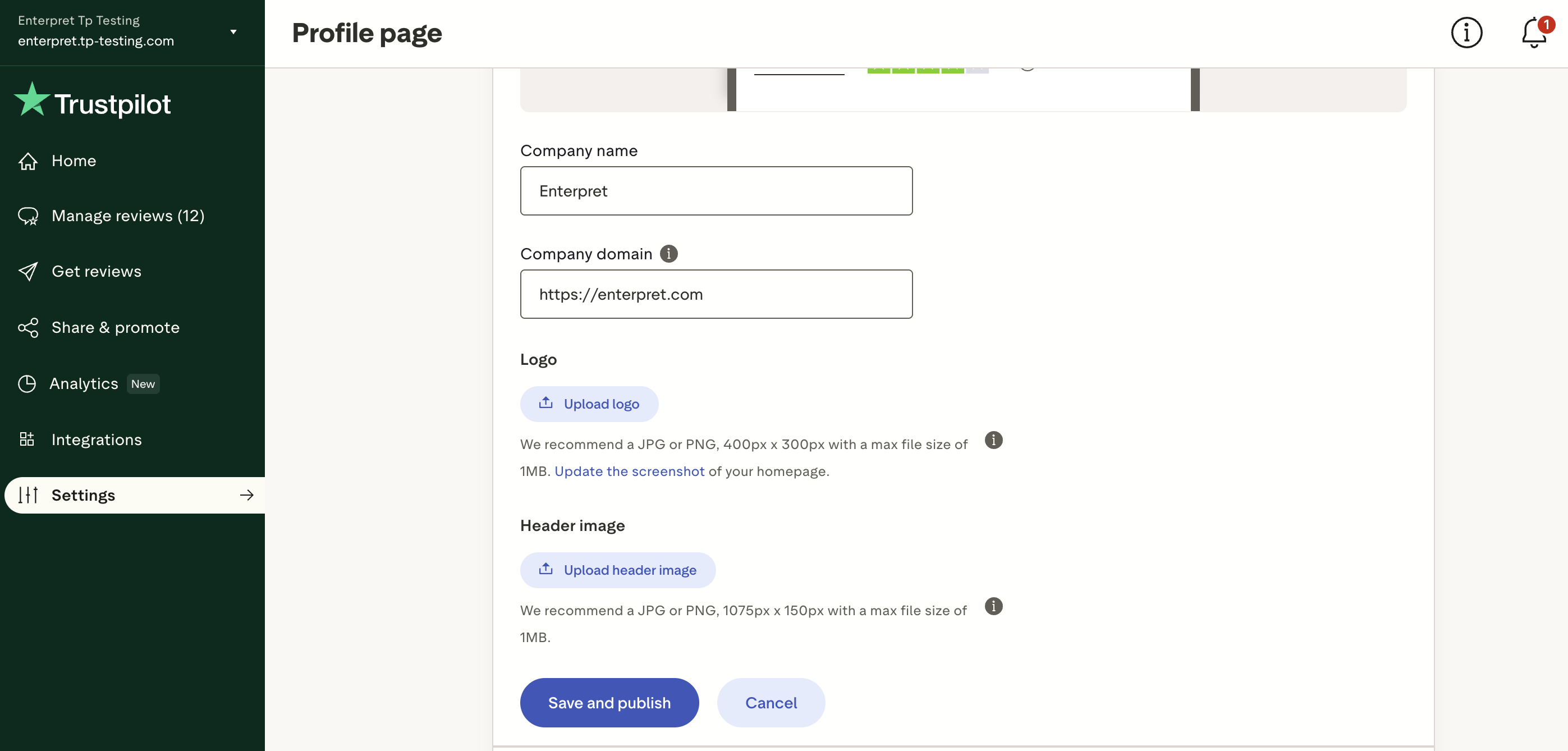
Option 2: Locate the domain in your Trustpilot Business profile settings. The following older navigation example may differ from your current account.
Go to Settings → Public profile settings → Profile page
Your domain is displayed at the top
Important: Enter the domain exactly as it appears in Trustpilot. If you have multiple domains (e.g., company.com and company.co.uk), each is a separate Business Unit and requires a separate integration.
Finding Your Product SKUs
SKUs are needed to ingest product-specific reviews.
To find your SKUs:
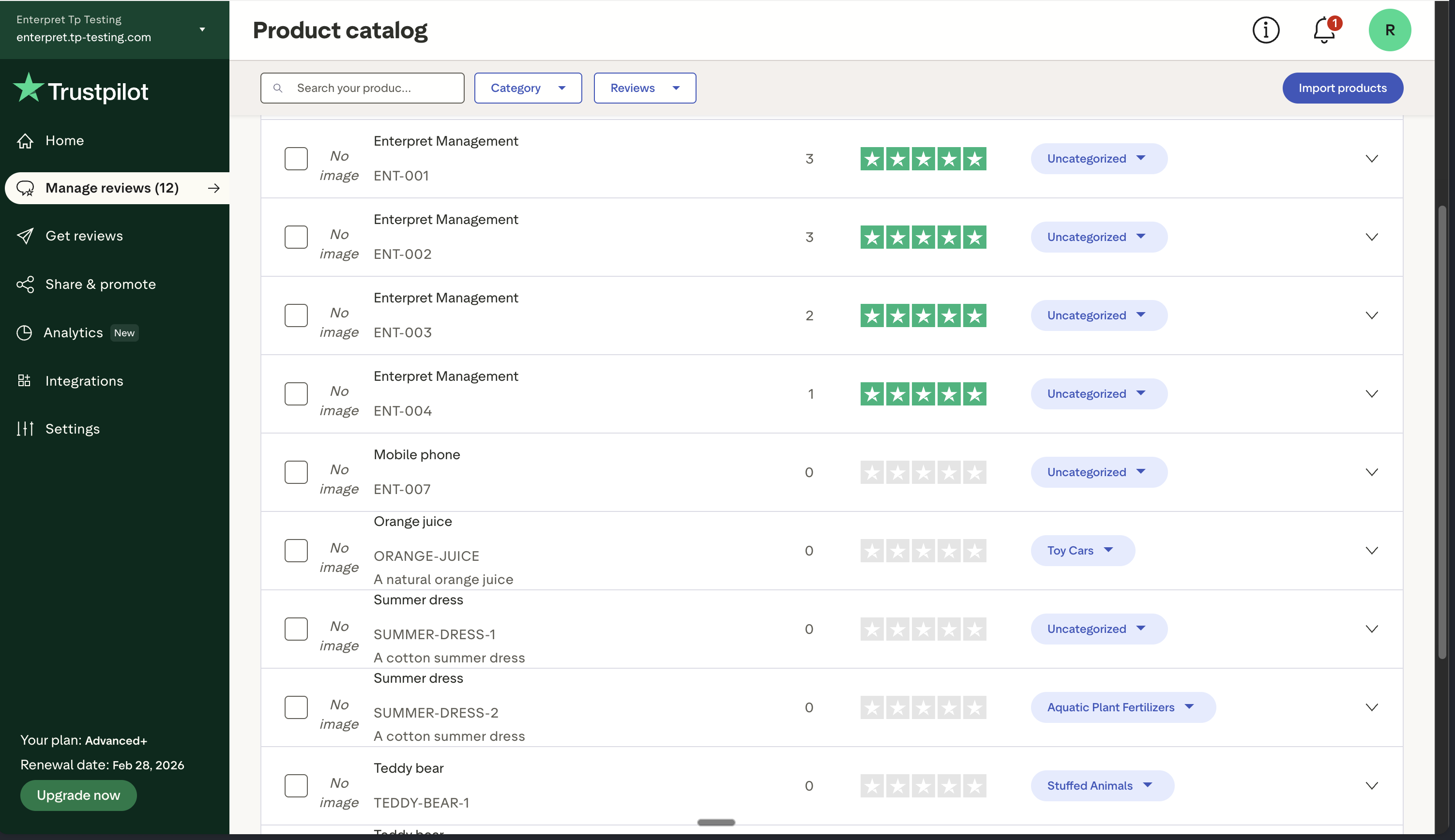
In Trustpilot Business, open your product catalog if product reviews are available. The following older navigation example may differ from your current account.
Navigate to Reviews → Product reviews → Product catalog
Your products and their SKUs are listed here
Tips:
SKUs in Trustpilot should match your ecommerce platform (Shopify, WooCommerce, etc.)
If a product has variants (sizes, colors), each variant may have a different SKU
You can add multiple SKUs during setup, separated by commas
Setting Up the Integration
Step 1: Navigate to Integrations
Click on your organization logo in the bottom left corner, then select
"Integrations"
Step 2: Add New Integration
Click + New Integration at the top of the page
Step 3: Find Trustpilot
Search for "Trustpilot" , select "Feedback Integration" and click Continue
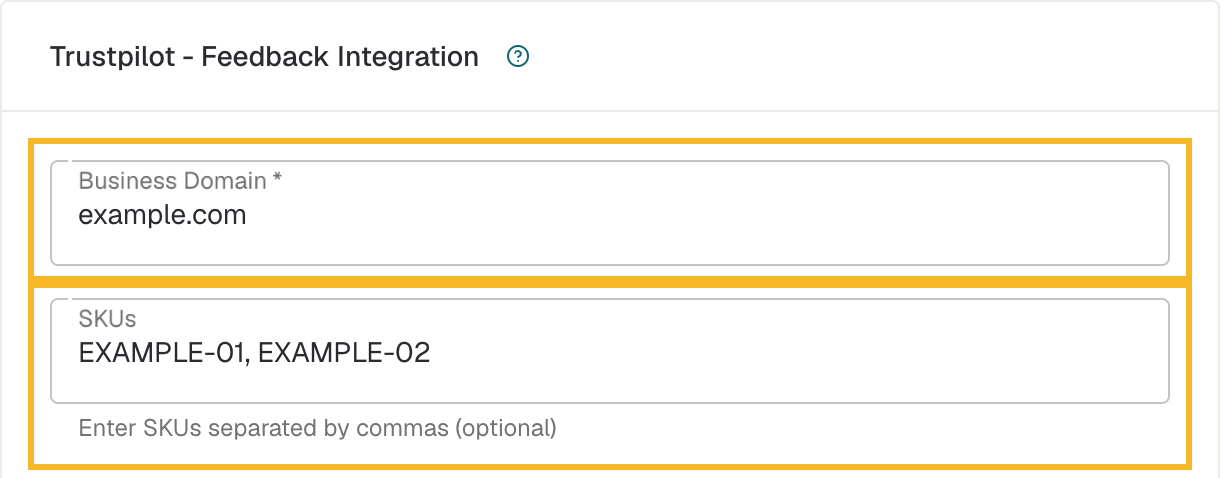
Step 4: Enter Your Business Domain
Enter your Trustpilot business domain exactly as it appears in your Trustpilot profile (e.g., yourcompany.com)
⚠️ Critical: The domain must match exactly. An incorrect domain will prevent data from being fetched.
Step 5: Add Product SKUs
To ingest product-specific reviews, enter your product SKUs. You can add multiple SKUs separated by commas.
Step 6: Save and Complete
Click Integrate to complete the setup. Enterpret will begin fetching your Trustpilot reviews.
What to Expect After Setup
Start by checking a known service review in Feed. If you entered product SKUs, check one product review and its SKU separately. Confirm the business domain and the saved SKU list before adjusting your scope.
Aspect | Details |
Historical Data | Historical reviews are fetched for the integration's configured backfill window, subject to source availability. Contact Enterpret to confirm the history available for your connection. |
Time to First Data | Initial import and processing time vary with the configured review history, product SKUs, volume, and source availability. The polling interval is not a first-data deadline. |
Ongoing Sync | Reviews are fetched periodically. The current default polling interval is 4 hours; your configured schedule can differ. Contact Enterpret to confirm it. Source availability and processing affect when reviews appear. |
Available Metadata
Once connected, the following metadata fields become available for filtering and analysis in Enterpret:
Service Review Metadata
Field | Description | Use Case |
| Star rating (1-5) | Filter by rating to analyze low-score drivers |
| Always "SERVICE" for these reviews | Distinguish from product reviews |
| Whether Trustpilot verified the review | Filter for verified-only analysis |
| When the review was submitted | Time-based trending |
| Last modification timestamp | Track review edits |
| When the customer's experience occurred | Correlate with business events |
| Direct link to review in Trustpilot | Jump to source for context |
Product Review Metadata
Field | Description | Use Case |
| Star rating (1-5) | Analyze product satisfaction |
| Always "PRODUCT" for these reviews | Distinguish from service reviews |
| Product identifier | Filter reviews by specific product |
| Specific attribute scores (if collected) | Deep-dive into product aspects |
| When the review was submitted | Track review volume over time |
| Direct link to review | Quick access to original |
Use Cases
The Trustpilot integration enables you to uncover insights that drive customer experience improvements and business decisions.
Here's what you can achieve:
Understand What Drives Star Ratings Go beyond the number to understand why customers leave 5-star or 1-star reviews. Identify the specific themes and keywords that correlate with high and low ratings.
Monitor Review Health Over Time Track review volume, average ratings, and sentiment trends to spot shifts in customer perception before they become problems.
Detect Emerging Issues Early Use anomaly detection to get alerted when specific themes or keywords spike in negative reviews, allowing you to respond proactively.
Analyze Product-Specific Feedback For e-commerce businesses, drill down into reviews by product SKU to identify which products are delighting customers and which need attention.
Compare Trustpilot vs Support Feedback Understand how public review feedback differs from private support conversations. Are customers complaining about the same issues, or do different themes emerge in different channels?
Identify Detractor Patterns Analyze 1-2 star reviews to uncover common complaints, helping prioritize fixes that will have the biggest impact on customer satisfaction.
Validate Product and Service Improvements After launching fixes or new features, monitor Trustpilot reviews to see if customer sentiment improves and negative themes decrease.
Build Voice-of-Customer Reports Combine Trustpilot insights with other feedback sources to create comprehensive VoC reports for leadership and cross-functional teams.
Managing Your Integration
Updating Product SKUs
After initial setup, you can add or remove product SKUs:
Go to Integrations
Find your Trustpilot integration and click Edit
Modify the SKU list as needed
Click Save
Connecting Multiple Domains
If your business has multiple Trustpilot profiles (e.g., different regional domains), set up a separate integration for each domain.
Current Limitations
Limitation | Details |
API Access Required | Trustpilot API access and Enterpret’s supported setup determine eligibility. Confirm these requirements with your Enterpret team. |
Single Domain Per Integration | Each Trustpilot domain requires its own integration setup. |
No Reply Sync | Business replies to reviews are not currently ingested. |
Troubleshooting
"No data appearing"
If data has not appeared, check the items below. Initial import time can vary; the default polling interval is not a first-data deadline.
✓ Verify the domain entered matches your Trustpilot profile exactly
✓ Confirm the Trustpilot API access and connection setup with your Enterpret team
✓ Confirm that you selected the intended Trustpilot business domain and business unit
"Missing product reviews"
✓ Confirm you entered the correct SKUs during setup
✓ Verify the SKUs match what's in Trustpilot Business → Product catalog
✓ Check that product reviews exist for those SKUs
For additional assistance, contact the Enterpret support team.
Analyze imported feedback with Enterpret Agent
After verifying the import, open Enterpret Agent in the app. If your workspace has the Enterpret app for Slack, you can ask there too. For a supported external agent, connect it to your workspace through the Enterpret MCP Server. Use an account with access to the imported feedback.
Review recent imported Trustpilot reviews. Keep service reviews and product reviews separate, and link representative reviews for each recurring issue.