
Data Enrichment
TLDR
Data Enrichment applies configured functions to feedback, including AI classifications, calculations, and normalization. Review the function’s inputs, outputs, and supported data types before enabling it.
What is Data Enrichment?
Data Enrichment runs configured transformations on supported feedback events and stores the outputs for analysis. Available functions and configuration options depend on your workspace.
What types of Data Enrichment are supported?
Data Enrichment includes 3 main capability areas:
AI-Powered Enrichment - Prompt-based functions like sentiment tracking across conversation lifecycles
Data Calculations - Automated metric calculations and text-to-numeric conversions
Data Normalization - Automated standardization and cleanup of inconsistent data formats
Getting Started
Accessing Data Enrichment
Open Integrations, then select Manage Unified Fields.
Select the Enrichment tab. If it is unavailable, ask your workspace administrator to check your enrichment-management permissions.
Click the Create New Enrichment button
How Enrichment Works
Enrichment automates data transformations by connecting source events to built-in functions:
Objects: Feedback records to transform. Standard Data Enrichment functions do not currently support account objects.
Triggers: Events such as creation or update that initiate enrichment.
Functions: Pre-built processors (e.g., Sentiment Shift, Country Normalizer).
Actions: Where to store the enriched output fields.
Each function follows an input → process → output pattern.
Setting Up Your First Enrichment
Objects:
Select Feedback Record and click NEXT
Trigger:
Select Created or Updated as the trigger type.
Select data sources to filter on
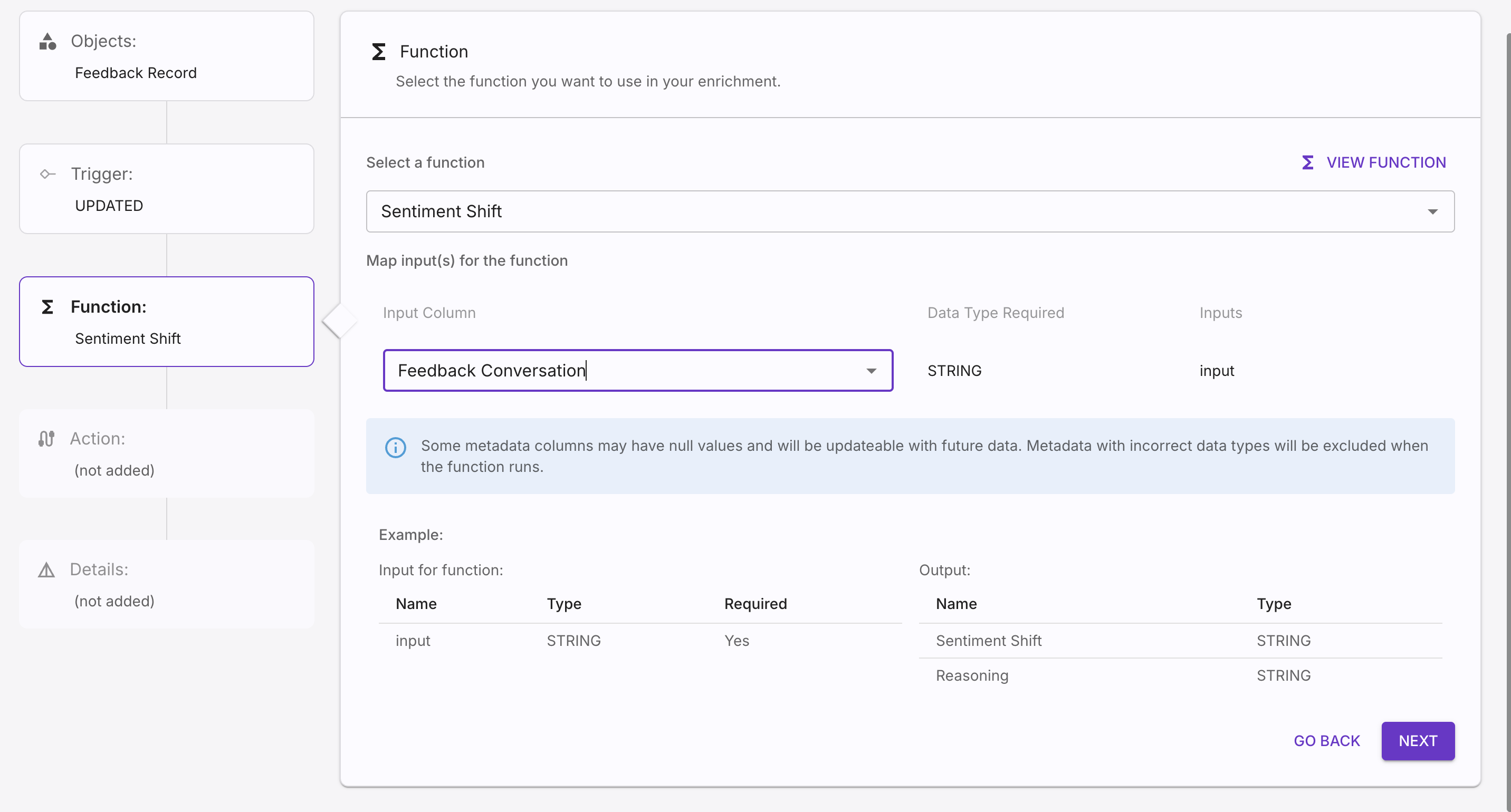
Function:
Select a function from the drop down menu
Select the Input Column
Action:
Define column names for the output fields
Click NEXT
Details:
Enter enrichment name and description
Click the check box to run backfill for this enrichment
Select date range to backfill enrichment data
Click CREATE
Global Enrichments
Use the functions offered in your workspace. The examples below describe possible enrichment patterns; confirm the selected function’s schema and configuration before using them.
AI-Powered Enrichments
AI-powered functions use prompts to classify or extract information from feedback. Review the prompt and supported inputs, and check outputs against representative records.
Sentiment Shift
Purpose: Detect tone changes throughout ticket lifecycles to identify which agents, channels, or topics improve or worsen customer sentiment.
Use Cases:
Surface which support agents consistently improve customer sentiment
Identify topics that tend to escalate or de-escalate situations
Track sentiment recovery patterns across different channels
Configuration:
Select Sentiment Shift if it is offered for your workspace.
Automatically analyzes multi-turn conversations
Results appear as a new field in your data explorer
Data Calculations
Data calculation functions automatically derive key metrics and convert data formats within Enterpret, so you can perform those calculations without external spreadsheets or custom scripts.
Total Response Time
Purpose: Calculate elapsed time between selected source timestamps. For resolution time, use fields that actually represent creation and resolution; Updated At can also include later edits.
Benefits:
No more manual time calculations in spreadsheets
Filter by the derived time field once enrichment has completed and the field is available.
Correlation with sentiment data for comprehensive analysis
Setup:
Select tickets/conversations data source
Map the intended start and end timestamps, and confirm their units and meanings. Use a resolution timestamp for resolution time; an Updated At value is not necessarily the resolution event.
Data Normalization
Normalization functions can standardize supported inputs. Test representative values and inspect missing or unrecognized inputs before relying on the output.
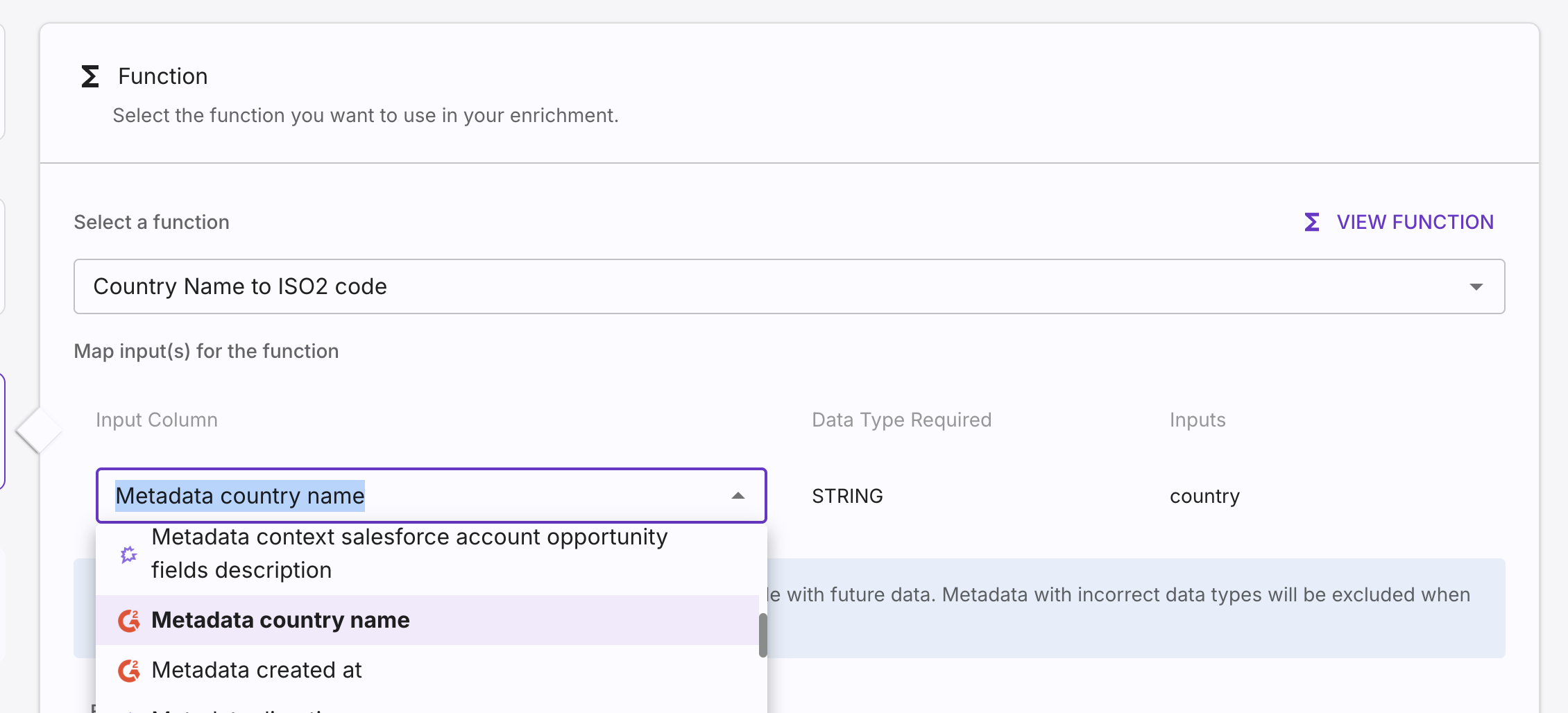
Country Code Standardization
Purpose: Clean up inconsistent country representations across data sources.
Examples:
"US," "USA," "United States" → "US"
"UK," "United Kingdom," "Great Britain" → "GB"
Setup:
Select a source.
Choose the Country to ISO2 function.
Select the field containing country data and map it as the function input.
Specify a name for the new output field.
Timestamp Conversion
Purpose: Convert epoch timestamps and inconsistent date formats into human-readable formats.
Examples:
1625097600000 → "2021-07-01 00:00 UTC"
Various date formats → Standardized ISO format
Custom Enrichments
Ask your Enterpret team about custom functions for transformations beyond the library available in your workspace. Examples to discuss include:
Industry-Specific Classifications: Custom categorization for your domain or business model
Advanced Pattern Recognition: Complex regex-based extractions for unique data formats
Specialized Calculations: Custom formulas for business-specific metrics
Workflow-Specific Enrichments: Functions designed around your team's unique processes
Common Custom Enrichment Examples
Qualitative Rating Conversion Convert your organization's specific text ratings into numeric scores for trending and analysis.
Example: "Excellent" → 5, "Good" → 3, "Needs Improvement" → 1
Why Custom: Each organization uses different rating scales and terminology
NPS response classification: Map valid numeric ratings to the standard promoter, passive, and detractor groups.
Example: 9-10 → "Promoter", 7-8 → "Passive", 0-6 → "Detractor"
Check: Standard NPS uses 9–10 for promoters, 7–8 for passives, and 0–6 for detractors. Label a different segmentation clearly rather than treating it as standard NPS.
URL Parameter Extraction Extract specific campaign data, user IDs, or tracking parameters from your website URLs.
Example: From "
shop.com/products?source=facebook&user=12345" extract Source: facebook, User ID: 12345Why Custom: URL structures and important parameters vary significantly by organization
Competitive Intelligence Tracking Identify mentions of your specific competitors in customer conversations.
Example: Detect mentions of "Competitor X" or "
CompetitorY.com" with count and contextWhy Custom: Each company has different competitors with various name variations
How to Request Custom Enrichments
Identify Your Need: Define the specific data transformation or insight you want to achieve
Contact Your CSM: Discuss your use case and provide sample data
Derived account attributes
To use an ARR band, account creation month, or account creation quarter in your analysis, calculate that value in your source system or data pipeline before syncing the account. Send the derived value as an account attribute; standard Data Enrichment functions cannot calculate it on the account after ingestion.
For Accounts webhook payloads and examples, see Syncing Users and Accounts. Contact your Enterpret team to discuss account enrichment requirements.