
Agent Memory
Personalize Enterpret Agent with Memory
When Memory is enabled, Enterpret Agent can reuse your saved preferences across conversations.
For example, ask Agent to:
Lead weekly summaries with the most important findings
Include supporting customer quotes in feedback analysis
Group reports by customer segment
Use terminology that is specific to your team
If a saved preference conflicts with your current request, Agent follows the instructions in your request. You can give different instructions for a particular conversation without changing your saved preferences.
Ask the Agent to remember a preference
Tell Enterpret Agent what you want it to remember in plain language. Start your request with “Remember to…” or “Remember that…” and include when the preference should apply.
For example:
Remember to keep my weekly summaries concise and lead with the three most important findings.
Remember to include customer quotes with source links when I ask for a weekly feedback report.
Remember that I prefer churn reports grouped by customer segment instead of product area.
After sending your request, check the Agent's response for confirmation that the preference was saved.
Tips for writing useful memory instructions
Include the situation where the preference should apply, such as weekly summaries, churn analysis, or executive reports.
Describe the outcome you want, such as a preferred structure, level of detail, terminology, or supporting evidence.
Save preferences you expect to reuse. For one-time instructions, simply include them in your current prompt.
View your saved Memory
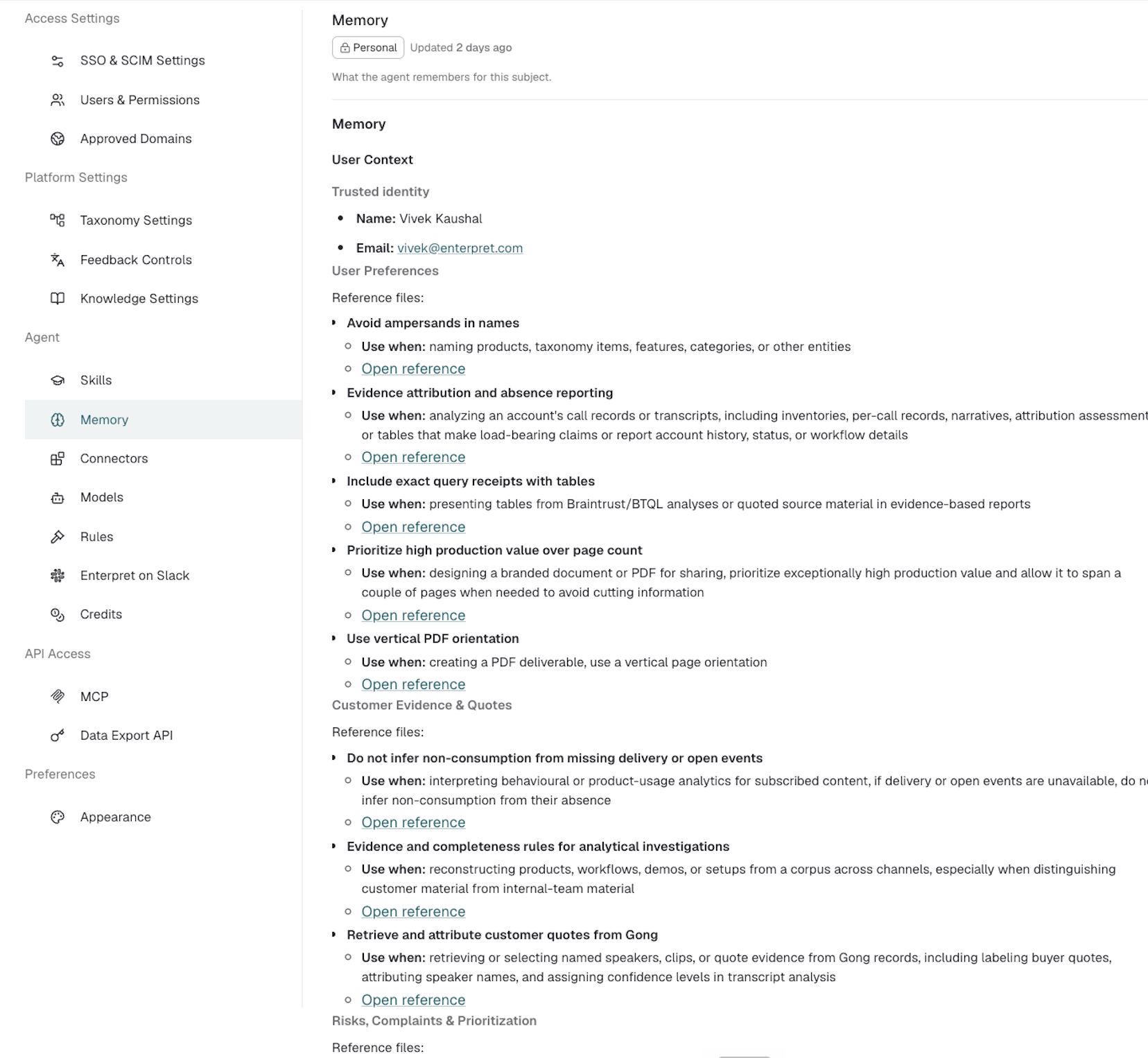
To review the guidance saved for you:
Open Settings.
Select Memory under Agent.
Review the saved topics and their Use when descriptions.
Select Open reference to see the saved guidance and when it was last updated.
The Memory page is currently read-only. To change a saved preference, ask Enterpret Agent to update it in chat.
Update a saved preference
Tell the Agent what should change and mention the relevant task or context.
For example:
Remember that for weekly reports, I now prefer findings grouped by customer segment instead of product area.
Check the Agent's confirmation, then review the updated guidance under Settings → Agent → Memory.
See when Memory is used in a conversation
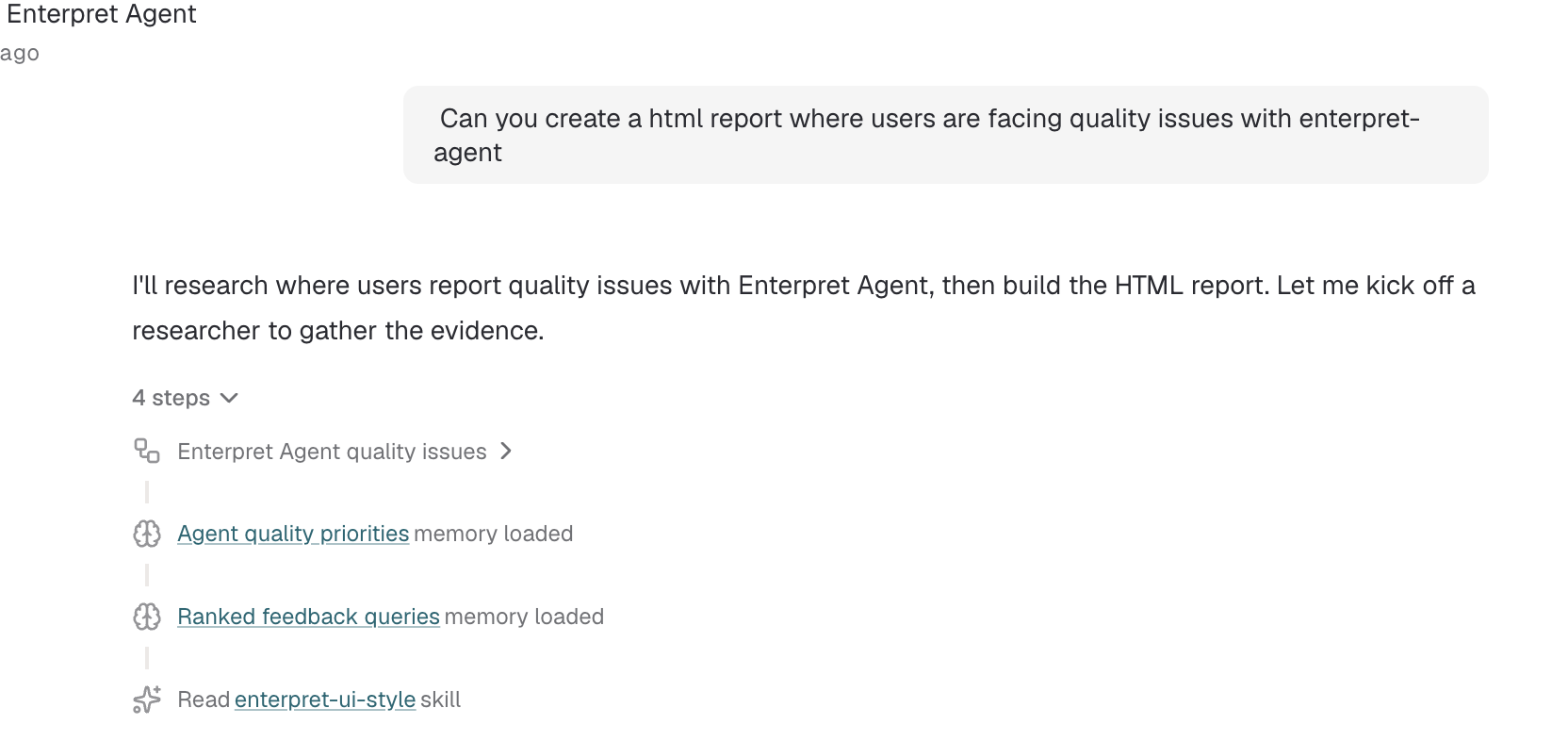
You can review the activity steps in an Agent conversation to see which memory references were loaded.
Open the relevant conversation.
Expand the Agent's activity steps.
Look for an entry labeled “memory loaded.”
Select the memory name to review the reference without leaving the conversation.
A “memory loaded” entry means the Agent reviewed that reference while working. It does not necessarily mean every part of the reference affected the answer.
Memory for automations
An automation can remember approaches from earlier runs and reuse them while following its current instructions and working with current information.
Automation memory is separate from your personal Memory. Automations use their own task-specific memory and do not inherit the personal preferences saved to your account.
Automation memory cannot currently be viewed under Settings → Agent → Memory.
What Memory saves and who can see it
Memory keeps selected, reusable guidance. It does not save every conversation as a preference.
Your latest request takes priority over conflicting saved guidance.
Your personal Memory is not shared with other users.
The Memory page currently lets you view saved guidance, but it does not include controls to edit, delete, reset, or view previous versions.
If a saved preference no longer reflects what you want, ask the Agent to update it and check for confirmation.
Frequently asked questions
Does Memory remember every conversation?
No. Memory keeps selected preferences so Agent can use them again. To find a past discussion, open the conversation itself.
Can I override a saved preference?
Yes. Instructions in your current request take priority. A one-time override does not automatically update the preference saved in Memory.
Can I edit or delete Memory from Settings?
Not currently. The Memory page is read-only. You can ask Enterpret Agent to update a saved preference in chat.
Can other users see or use my Memory?
No. Personal Memory is specific to you within your Enterpret organization.
Does an automation use my personal preferences?
No. Automation memory is separate from personal Memory and is specific to that automation.
Why do I not see a preference I asked the Agent to remember?
First, check the conversation for confirmation that the preference was saved. If you did not receive confirmation, try again with a clear instruction that begins with “Remember to…” or “Remember that…” and explain when it should apply.
Memory and report automations
To send the same report daily or weekly, set up scheduled Agent automations with the prompt, scope, schedule, delivery, connectors, and tool permissions. Each automation uses its own Memory.