
SFTP Integration
The SFTP integration lets you deliver feedback to Enterpret by dropping JSONL files onto an SFTP server we connect to. Enterpret polls that server on a fixed schedule, picks up new files, parses them, and ingests every record. It's the right choice when you can't push to a webhook (batch exports, nightly jobs, vendor-provided feeds) but can produce JSONL files on a schedule.
Heads-up: SFTP records share the same JSON record schema as the Webhook Integration. The same payload that works as a webhook body works inside a .jsonl line on SFTP — so this article focuses on the transport (server, files, polling, errors). For deep schema details, refer to the webhook article.
How it works
You give Enterpret a set of SFTP credentials and a remote directory.
Enterpret polls that directory on a schedule.
On each poll we list the directory, pick the next file in
(modified-time, name)order, and stream-parse it.Each record is validated and ingested. Records that fail validation are written to a failed records folder (in Enterpret-managed S3.
Example of ingested feedback records visible in the dashboard after SFTP processing.Once a file is fully drained, Enterpret advances its internal "watermark" so the same file is never reprocessed (unless you re-upload it with a new modified time).
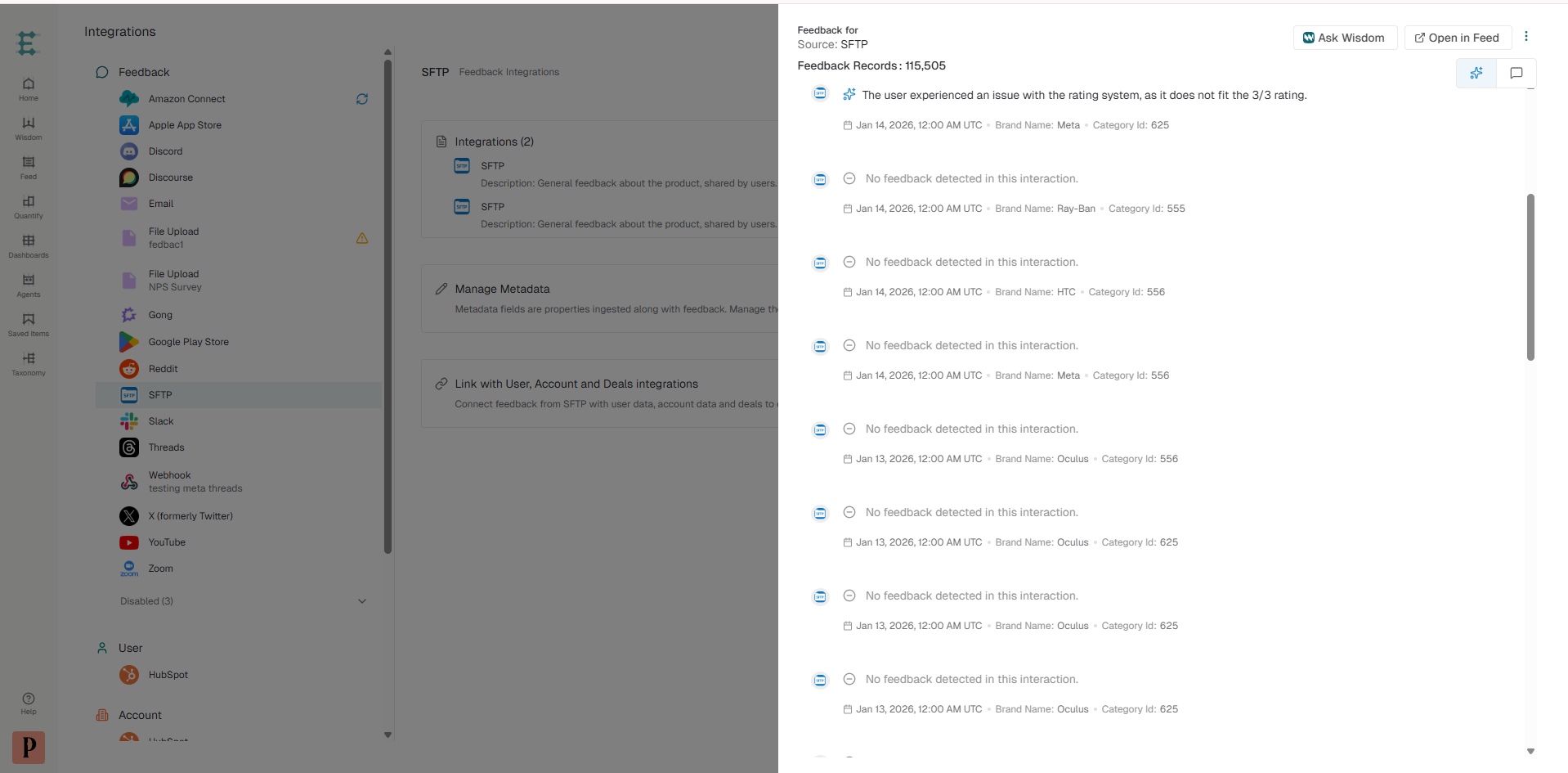
We never delete or modify files on your server. Cleanup is your responsibility.
What we need from you to get set up
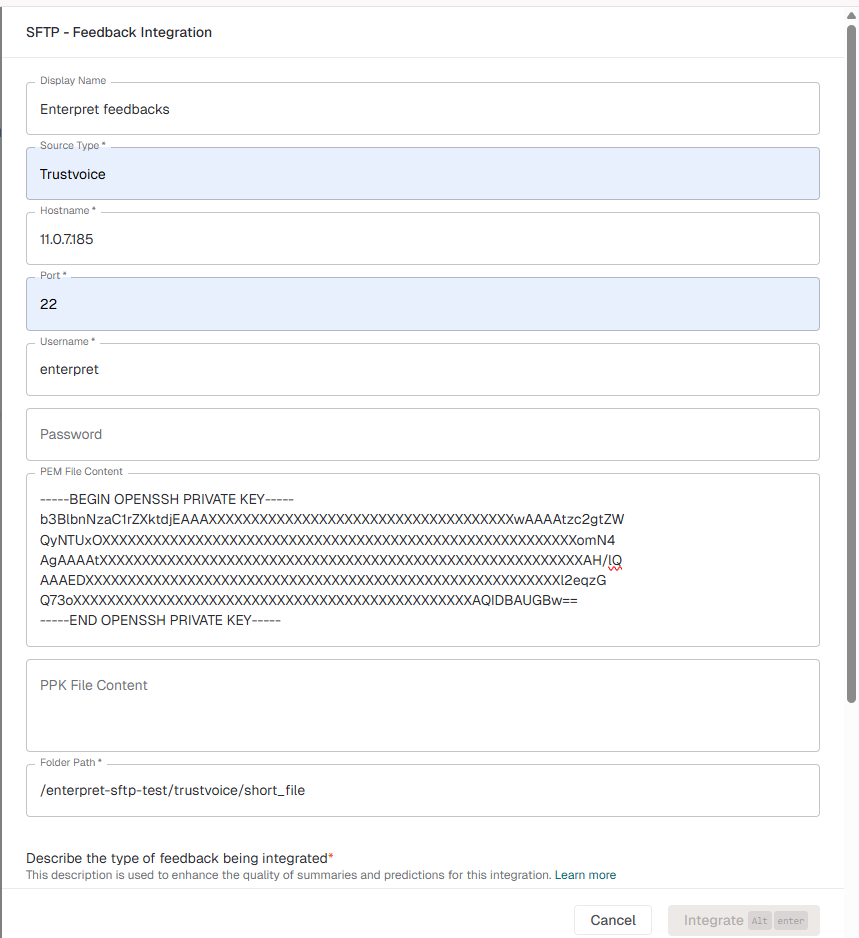
Send the following to your CSM or Enterpret point of contact. Everything except the source-type label is a hard requirement.
Field | Description | Example |
Source type | A short label that identifies this feed downstream (used for filtering in the dashboard). Free-form. |
|
Hostname | SFTP server hostname or IP. |
|
Port | SFTP port. Defaults to |
|
Username | The user Enterpret will log in as. We strongly recommend a dedicated read-only user. |
|
Authentication | One of: password, PEM private key, or PPK private key. Pick exactly one. | (see below) |
Remote directory | Absolute path on the SFTP server where you'll drop files. |
|
SSH host key fingerprint | The SHA256 fingerprint of your server's SSH host key. We use this to verify we're talking to the right server (prevents man-in-the-middle attacks). |
|
Authentication options
You must provide exactly one of:
Password — simplest, but rotate regularly.
PEM private key — OpenSSH format. The corresponding public key must be in the user's
~/.ssh/authorized_keyson your server.PPK private key — PuTTY format. Same authorized-keys requirement.
🔐 Encrypted private keys are supported. If your PEM or PPK is passphrase-protected, send the passphrase in the **password** field. The integration uses the same field for both SSH-password auth and key passphrase — never both at once.
Credentials are stored encrypted at rest. If you ever need to rotate, contact us — we'll update the integration in place.
Why we need the host key fingerprint
SSH has no built-in certificate authority, so the only way for us to be sure we're connecting to your server (and not an attacker) is for you to tell us the expected SSH host key fingerprint up front. We fail closed: if we ever connect and the server's key doesn't match, the poll fails immediately rather than silently trusting a new key.
You can grab the fingerprint with:
ssh-keyscan -t rsa,ed25519 sftp.acme.com 2>/dev/null | ssh-keygen -lf -
Send us the SHA256:… line.
File requirements
Supported extension
Only .jsonl is supported. Each file must contain one JSON object per line, separated by \\n (CRLF endings are also fine — every line just needs a final newline). Files with any other extension are silently skipped — we won't try to parse .json, .csv, .xml, .txt, .zip, etc.
A minimal JSONL file looks like:
{"id":"review-12345","type":"REVIEW","timestamp":1714838400,"text":"Loved it"} {"id":"review-12346","type":"REVIEW","timestamp":1714838460,"text":"Confusing onboarding"}
{"id":"review-12347","type":"REVIEW","timestamp":1714838520,"text":"Great support"}
File-size limits
Limit | Value |
Maximum file size | 2 GiB |
Maximum line length | 10 MiB per line |
Files over 2 GiB are skipped (we log a warning and advance past them so they don't block newer files). Lines over 10 MiB are recorded as parse failures and we keep going with the rest of the file. If you need to ingest more than 2 GiB at once, split it across multiple files.
Atomic uploads — the most important rule
⚠️ Never read your file before it's fully written. Enterpret skips any file whose modification time is less than 10 minutes old. This is intentional: it gives your upload time to finish.
The safe pattern is:
Write your file to a temporary name (e.g.
feedback_2026-05-04.jsonl.tmp).When the write is fully complete, rename it to the final name (
feedback_2026-05-04.jsonl).
Renames are atomic on POSIX filesystems, so Enterpret will never see a half-written file under the final name. Don't stream-write directly to the final name — even with the 10-minute window, very long uploads can still race.
If your upload tool doesn't support atomic renames, write under one of the in-flight extensions we ignore (`.tmp`, `.partial`, `.swp`, `.lock`, `.crdownload`) and rename to `.jsonl` only after the write completes.
Files we ignore (hidden / temp / partial)
We skip any file whose name:
Starts with
.(e.g..DS_Store,.staging.jsonl)Starts with
~(e.g.~$open.jsonl)Ends with
.tmp,.partial,.swp,.lock, or.crdownload(case-insensitive)
Use any of these as in-flight extensions if your upload tool doesn't do atomic renames.
File ordering and naming
Files are processed in (modified-time ascending, then path ascending) order. So:
A file uploaded earlier always wins over one uploaded later.
Two files with the same mtime are processed alphabetically by path.
We recommend including a timestamp in your filename (feedback_2026-05-04T14-00.jsonl) for easy troubleshooting, but it's not what we use to order — only the mtime + path is.
Record schema
Each line inside your .jsonl file must look like this:
{ "id": "review-12345", "type": "REVIEW", "timestamp": 1714838400, "text": "Loved the new export feature, but onboarding was confusing.", "metadata": [ { "name": "rating", "value": "4" }, { "name": "country", "value": "US" }, { "name": "tags", "value": "feature-request" }, { "name": "tags", "value": "onboarding" } ] }
(One such object per line, no commas between lines, no wrapping [ ].)
Required fields
Field | Type | Notes |
| string | Unique per record. If you send the same |
| string | Must be exactly |
| number or string | Unix epoch (seconds, ms, μs, or ns — auto-detected by magnitude) or an ISO date in |
| string | The customer feedback. **Must be non-empty after trimming whitespace** — empty-text records are written to the failed-records bucket |
Optional fields
Field | Type | Notes |
| array of | Structured properties — see below. |
Metadata format and gotchas
Metadata is delivered as an array of {name, value} objects, not a flat map. This lets you send the same key multiple times (multi-select tags, multi-line addresses).
"metadata": [ { "name": "rating", "value": "4" }, { "name": "country", "value": "US" }, { "name": "tags", "value": "feature-request" }, { "name": "tags", "value": "onboarding" } ]
Behavior:
A key that appears once is stored as a single string.
A key that appears multiple times is stored as an array, in the order it appears in the file.
Entries with an empty or missing
nameare silently skipped.All values are coerced to strings at ingest time. Numbers and booleans are stringified ("4" instead of 4 is fine, the system normalizes both).
Metadata keys are promoted to top-level filterable fields in the Enterpret dashboard, so make them human-readable (
country, notc1).
ℹ️ Unlike the webhook schema, SFTP metadata does not use "s"/"n"/"b" type indicators. Just send {name, value} pairs.
What happens when something goes wrong
We separate failures into three categories, each with very different behavior. Understanding the difference is the key to diagnosing problems.
1. Connection failures (poll-level)
These prevent us from connecting to your server at all, or from listing the directory. The whole poll fails and no progress is made — we'll retry on the next scheduled poll.
Error you'll see in the integration health dashboard | What it means | What to do |
| We couldn't open a TCP connection. | Check that your server is up, on the right port, and reachable from Enterpret's IP range. Confirm any firewall / VPN allow-list. |
| TCP works, SSH auth failed. | Verify the username, password, or private key. Check |
| The server presented a different SSH host key than the fingerprint we have on file. | Either your server's host key was rotated (legitimate — re-share the new fingerprint with us) or the connection is being intercepted. Don't reuse — investigate. |
| Your integration was created without a fingerprint and our env override isn't set. | Re-share the SHA256 fingerprint with us so we can save it on the integration. |
| We connected and authenticated, but can't read the remote directory. |
|
2. File-level failures
These happen when we can read the directory but can't process a specific file. The file is skipped or aborted, and the watermark behavior depends on the failure type.
Failure | What we do | Watermark behavior |
File over 2 GiB | Skip with a warning. | Advances past the file so it doesn't block newer files. |
Unsupported extension (anything other than | Silently skip. | Skipped entirely — we never look at non- |
Hidden / temp file | Silently skip. | Same as above. |
File mtime is within 10 min stability window | Skip this poll. | Does not advance — we'll reconsider it on the next poll once it's settled. |
3. Record-level failures (line-by-line)
These happen when the file itself is readable but individual lines are malformed or fail validation. Bad lines do not block good ones. Good lines on either side of a bad line are still ingested.
Failure | Reason saved on the record |
Missing or empty |
|
Missing/unparseable |
|
Missing |
|
Missing or whitespace-only | missing or empty text |
|
|
Line is malformed JSON (broken syntax, trailing junk after the object) |
|
Line is the literal |
|
Line exceeds the 10 MiB cap |
|
Where to find failed records: Failed records are bundled into a JSON blob and uploaded to an Enterpret-managed S3 bucket under:
sftp/<integration-id>/failed/<DD-MM-YYYY>/<file-name>_<unix-ts>_failed.json
Ask your CSM for a presigned URL or a copy of the blob if you need to debug a specific batch. The blob contains the raw record JSON annotated with _validation_error (or _parse_error + _raw for hard parse failures), so you can see exactly which fields tripped each record.
ℹ️ Failed records are not retried automatically. If you fix the data, re-upload the file (or just the corrected lines) — Enterpret-side deduplication is keyed off id, so re-sending the same id will overwrite the previous version.
Polling, watermarks, and resumability
You don't normally need to think about this — but if a file ever looks "stuck" or duplicate, here's the model:
We track an internal cursor of
(last_modified_epoch, last_processed_path). After each successful file we advance both.Files with mtime older than the cursor's epoch are skipped.
Files with mtime equal to the cursor's epoch are skipped if the path is alphabetically
<=the cursor's path. (Same-mtime files are processed in path order.)Files with mtime newer than the cursor are eligible.
What this means for you:
A file you’ve-upload gets a new mtime, so we'll reprocess it. Records with the same
idwill overwrite previous versions, not create duplicates.A file you backdate (touch with an older mtime) may be skipped if its mtime is now older than the cursor. Don't manually backdate files unless you also reset the integration with us.
Large files paginate. A
.jsonlfile with millions of lines won't be drained in one poll — we cap at 2,000 records per fetch, then resume on the next poll using a precise byte offset. You'll see the file remain "in progress" across several polls, which is normal — and because resume is byte-accurate, no lines are reprocessed or skipped at the boundary.Mid-fetch re-uploads are safe but wasteful. If you overwrite a file while we're streaming it, we'll detect that the mtime changed, discard our resume cursor, and start that file over from the beginning on the next poll. Records already ingested are deduplicated downstream, so you won't get duplicates — but you will burn extra polls.
Limits at a glance
Limit | Value |
Max file size | 2 GiB |
Max line length | 10 MiB |
Records emitted per poll | 2,000 (large files paginate across polls) |
File stability window | 10 minutes (mtime must be at least this old to be picked up) |
Default polling cadence | ~15 minutes (confirm with your CSM) |
Supported extension |
|
Supported record types |
|
Troubleshooting checklist
If a file isn't being ingested, run through this list before contacting support:
Is the file in the configured remote directory? Subdirectories are not crawled.
Does the filename end in
.jsonl? Case doesn't matter, but.jsonand.txtare not picked up.Does the filename start with
.or~, or end in.tmp,.partial,.swp,.lock,.crdownload? Those are ignored on purpose.Is the file's modification time at least 10 minutes ago?
statit on the server. If you just uploaded it, wait a poll cycle.Is each line a complete JSON object on a single line, terminated by
\\n? A common mistake is pretty-printing each record across multiple lines — that breaks JSONL.No line should exceed 10 MiB. If you have very large
textfields, consider truncating or splitting.If records are failing validation, ask for the failed-records blob to see the exact reason per record.
Frequently asked questions
How quickly will my data appear in Enterpret?
Polls run every ~15 minutes, files must be at least 10 minutes old before they're eligible, and large files paginate across polls. So expect a worst case of ~30 minutes from drop to ingestion for a small file, and longer for very large ones.
Can I send updates / corrections?
Yes. Re-upload a record with the same id and the new content; the previous version is overwritten downstream. Use a new file (or the same file with a new mtime) so we re-read it.
Can I delete records via SFTP?
Not via the SFTP path. Contact your CSM for record deletion / GDPR requests.
Will Enterpret delete or move my files after processing?
No. Files stay where you put them. You're responsible for cleanup. We recommend a daily/weekly rotation: move processed files to a sibling archive/ directory (which we don't read) once you're confident they've been ingested.
Can I have multiple SFTP integrations?
Yes. Each integration has its own credentials, remote directory, and source-type label, and is polled independently.
What's the difference between SFTP and the Webhook integration?
Webhook: real-time push, you call our API. Best for live data and small batches.
SFTP: scheduled pull, we read your files. Best for batch exports, vendor feeds, and anything that already produces files.
The record schema is almost identical — the same JSON object that works as a webhook body works as a .jsonl line. SFTP is more restrictive on type (only REVIEW).
Why is JSONL the only supported format?
JSONL is the only format where we can resume a partially-read file at the exact byte we left off — which lets us cap memory usage on multi-gigabyte files and never reprocess or skip a record at the resume boundary. Plain JSON arrays and zipped archives don't give us that guarantee.
Can I send CONVERSATION, SURVEY, AUDIO_RECORDING, or FORUM_CONVERSATION_THREAD records via SFTP?
Not today. Those record types require structured fields (multi-message conversations, Q&A pairs, audio URLs) that the flat SFTP record shape doesn't carry. Use the Webhook integration for those.
My SFTP server's host key changed — what do I do?
Until self-serve key rotation is available, delete and recreate the integration to pick up a new host key. The fingerprint is captured automatically on first successful connect (TOFU).
Note: Recreating resets the watermark, so existing files may be reprocessed (no duplicates downstream due to ID dedupe, but it may consume extra poll cycles).
If preserving watermark state is critical, contact your CSM—engineering can update the stored fingerprint manually.
Can I use a non-standard port?
Yes — share the port number when you set up the integration.
If you run into anything not covered here, message your CSM with: the integration name, the filename in question, the time you uploaded it, and (if available) the failure message from the integration dashboard. That's enough for us to pinpoint the issue 95% of the time.