
Webhook Integration
In this article
In this article group
Introduction
Enterpret's Custom Webhook integration lets you programmatically send customer feedback to Enterpret for analysis. This method is ideal for connecting feedback sources not supported by native integrations—making it easy to consolidate all your feedback in Enterpret.
Sending user or account data? The feedback payloads, batch sizes, and update rules in this guide apply to /webhook/custom/all. User and account data use separate endpoints: /webhook/users/custom and /webhook/accounts/custom. Follow Syncing Users and Accounts for their schemas and behavior.
When to Use a Custom Webhook
Use this integration when you're working with:
Review platforms that are not natively supported by Enterpret
Forum feedback that requires custom collection
Chatbot conversations from platforms without direct integrations
Survey tools specific to your industry
Internal feedback systems built for your organization
Feedback extracted from data warehouses (e.g., Redshift, BigQuery)
Note: Before proceeding, visit our native integrations page to see if your feedback source is already supported.
💡 Tip: Before sending bulk data, validate your payload with the Webhook Payload Validator. Paste your JSON, preview how records will appear in the dashboard, and generate a ready-to-use cURL command. No API key required.
Prerequisites
API access to your feedback source
Engineering resources to implement the webhook connection
An Enterpret Owner or Admin account with permission to manage integrations
Not an engineer? This guide is designed for developers and contains technical instructions. Please share it with your engineering team for implementation.
Getting Started
Create an API Key
Go to the Integrations page in your Enterpret instance (use the setup path available in your workspace; see the onboarding note below)
Click +New Integration, and search for "Webhook"
Choose the type of webhook integration based on your needs:
Feedback Integration – Send customer feedback into Enterpret
User Integration – Send user data to enrich feedback analysis
Account Integration – Sync account (company) data for account-level insights
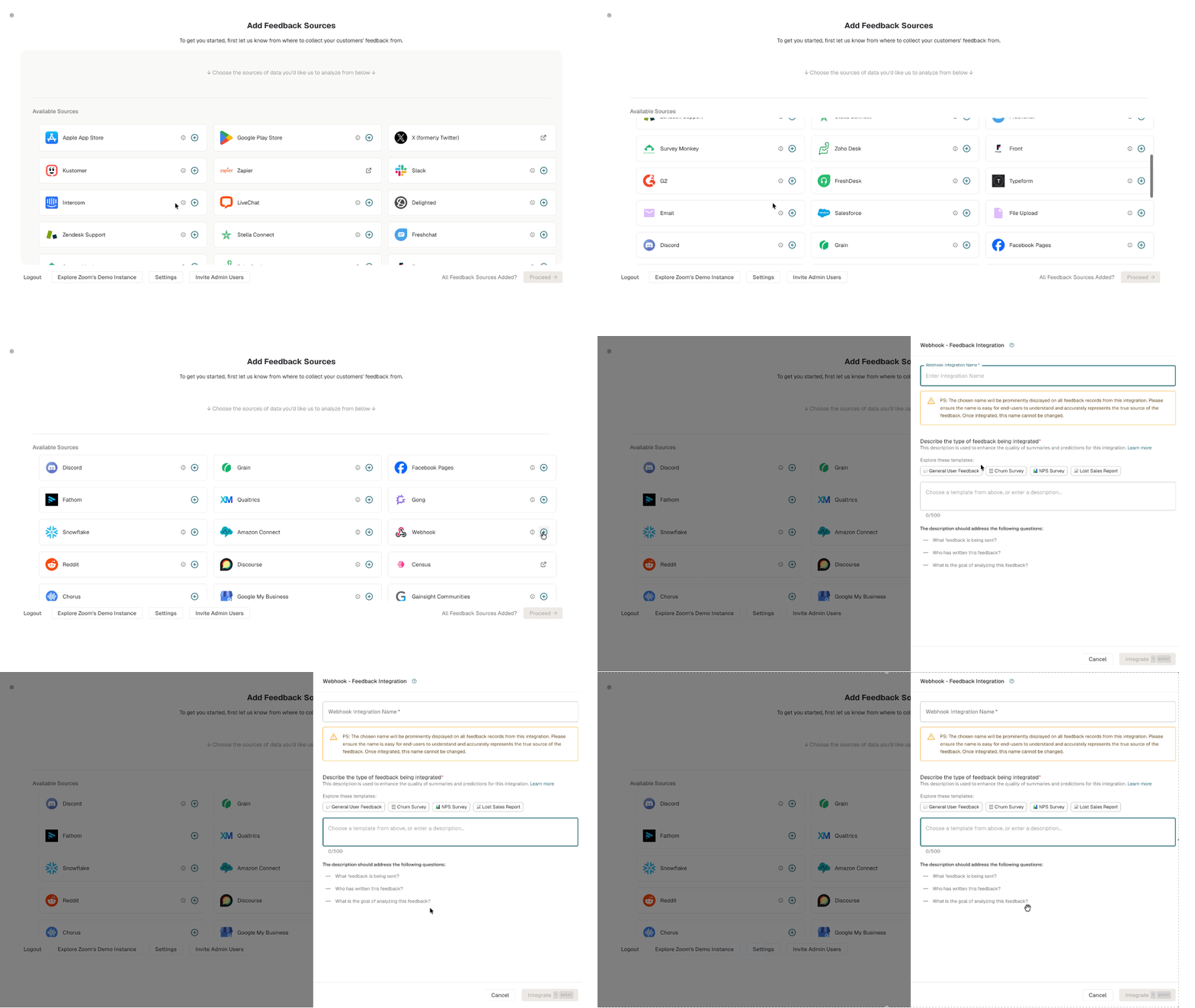
Provide a descriptive Display Name for your integration
This name will appear as the source for records throughout Enterpret
Add the requested description of the feedback source, audience, and analysis goals
Once configured, you'll find your API key at the top of the integration page
This key should be included in all API requests to authenticate

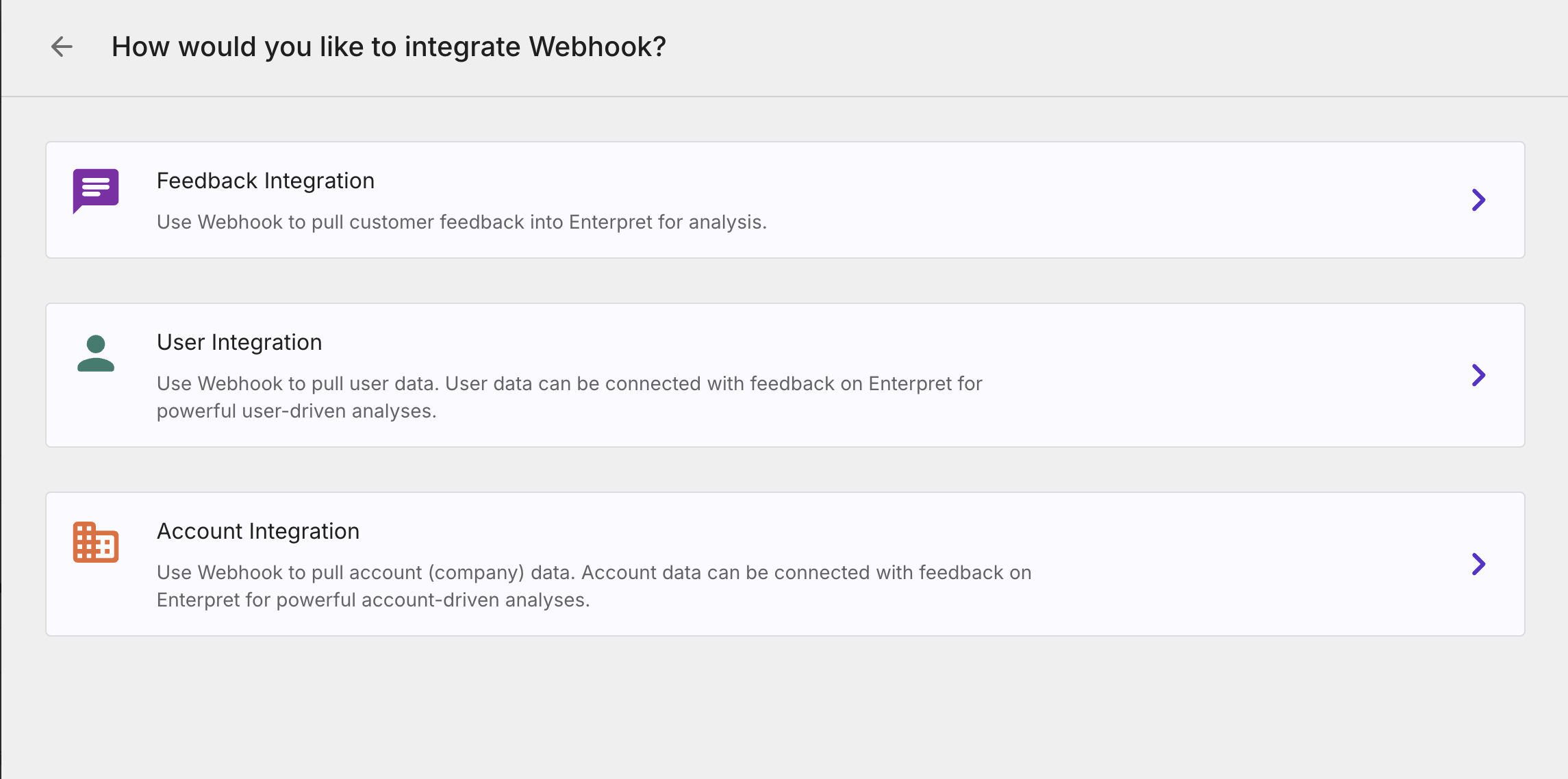
📍 Choose the available setup path
For an existing workspace, open the account menu and choose Integrations, or use Settings → Integrations where shown. Follow steps 1–5 above.
If your workspace offers an Add Feedback Sources onboarding screen, choose Webhook there and follow the feedback-integration form. Supply the name and source description requested by the form.
Navigation can vary by onboarding flow and workspace configuration. Use the controls shown in Enterpret or contact your Enterpret team if the source setup is unavailable.
Webhook Endpoint & Authentication
Endpoint URL: https://api.enterpret.com/webhook/custom/all
Authentication: Include your API key in every request header
api-key: your-api-key-here
Hard Limits (Enforced):
Request-rate limits: follow the limits communicated for your workspace; handle HTTP 429 with backoff
Maximum whole-request payload: 1 MiB (1,048,576 bytes); maximum serialized record: 200 KiB (204,800 bytes)
Maximum: 100 records per batch; start with smaller batches
Data Structure Overview
Webhook payloads must follow a structured JSON format. Enterpret accepts data in JSON format with a specific structure based on the feedback type.
Supported Feedback Types
We support five primary types of feedback:
REVIEW - Simple product/service reviews
CONVERSATION - Multi-message interactions between users and agents
SURVEY - Question-and-answer format feedback (NPS, CSAT, product feedback forms)
AUDIO_RECORDING - Voice recordings with optional transcripts
FORUM_CONVERSATION_THREAD - Forum/community posts with threaded replies (e.g., Facebook groups, Reddit, Discourse). The first message represents the original post, and subsequent messages are comments/replies.
Core Fields
Use the records wrapper and include the fields required for the selected feedback type. The following complete REVIEW example includes its required text field:
{
  "records": [
    {
      "id": "unique-identifier",
      "fileID": "source-identifier",
      "type": "REVIEW",
      "createdAt": 1768913221,
      "metadata": {
        "metadata": {
          "custom_field": {
            "array": {
              "s": [
                "value1",
                "value2"
              ]
            }
          }
        }
      },
      "text": "Example review text"
    }
  ]
}
createdAt must follow following rules:
Send a Unix epoch integer in seconds — not a date string like
"2024-05-23". Seconds are recommended; the normalization behavior for millisecond inputs is described belowMust not be before year 2000 — timestamps before Jan 1, 2000 are rejected as likely misconfigured
Must not be in the future — timestamps ahead of current time are rejected
Note: Timestamps that appear to be in milliseconds (13 digits, e.g. 1716460800000) are automatically converted to seconds on ingestion. Sending Unix seconds directly is still the recommended format to avoid ambiguity.
Detailed Guides by Feedback Type
REVIEW Type
REVIEW Type
The simplest feedback format, ideal for app store reviews, product reviews, etc.
Required fields:
text: The review content. A missingtextfield is rejected. Supply non-empty feedback text; empty or whitespace-only content can be removed during downstream sanitization.
Example:
{
  "records": [
    {
      "type": "REVIEW",
      "createdAt": 1716460800,
      "text": "This product works exactly as described. Very happy with my purchase!",
      "metadata": {
        "metadata": {
          "rating": {
            "array": {
              "n": [
                5
              ]
            }
          },
          "platform": {
            "array": {
              "s": [
                "iOS App Store"
              ]
            }
          }
        }
      },
      "id": "review-001",
      "fileID": "product-reviews"
    }
  ]
}
SURVEY Type
SURVEY Type
Use for structured question-and-answer feedback like NPS, CSAT, and product feedback surveys.
Required fields:
surveyResponse: Contains an array of responsesFor every response that has
answerorselectedOptions, the question field must be non-empty — otherwise the record returnsErrCodeMissingRequiredFieldResponses with neither
answernorselectedOptionsare filtered out safely and do not need a question
Example:
{
  "records": [
    {
      "id": "survey-456",
      "fileID": "nps-survey",
      "type": "SURVEY",
      "createdAt": 1768913221,
      "surveyResponse": {
        "responses": [
          {
            "question": "How likely are you to recommend our product to a colleague?",
            "answer": "9"
          },
          {
            "question": "What is the primary reason for your score?",
            "answer": "The product is intuitive and saves me time on daily tasks."
          },
          {
            "question": "Which features do you use most often?",
            "selectedOptions": [
              "Dashboard",
              "Reports",
              "API"
            ]
          }
        ]
      },
      "metadata": {
        "metadata": {
          "nps_score": {
            "array": {
              "n": [
                9
              ]
            }
          },
          "user_segment": {
            "array": {
              "s": [
                "Enterprise"
              ]
            }
          }
        }
      }
    }
  ]
}
CONVERSATION Type
CONVERSATION Type
Ideal for support tickets, chat transcripts, or any back-and-forth communication.
Required fields:
conversation: Contains an array of messages. Must contain at least one messageAt least one message must have non-empty text — messages with empty or whitespace-only text are filtered out after ingestion
Each message needs
textandactorfieldsActor must be one of: "user", "agent", or "bot" (any other value rejects the record)
Example:
{
  "records": [
    {
      "id": "01JY05BQ6EV1RPSXJ61K0BV0YA",
      "type": "CONVERSATION",
      "fileID": "proto_chat",
      "createdAt": 1768913221,
      "conversation": {
        "msgs": [
          {
            "actor": "bot",
            "text": "Hello boom504!"
          },
          {
            "actor": "bot",
            "text": "Hello boom504!"
          }
        ]
      },
      "metadata": {
        "metadata": {
          "src_account_id": {
            "array": {
              "s": [
                "TybFPBMTLnY96T5nQ"
              ]
            }
          },
          "website": {
            "array": {
              "s": [
                "SportsBet"
              ]
            }
          },
          "primary_product": {
            "array": {
              "s": [
                "Cross Sell"
              ]
            }
          },
          "tech": {
            "array": {
              "s": [
                "Web"
              ]
            }
          },
          "channel": {
            "array": {
              "s": [
                "Desktop"
              ]
            }
          },
          "value_segment": {
            "array": {
              "s": [
                "High Value 1"
              ]
            }
          },
          "active_segment": {
            "array": {
              "s": [
                "Active High"
              ]
            }
          },
          "sportsbook_ccf": {
            "array": {
              "s": [
                "CCF 0.1"
              ]
            }
          },
          "vip": {
            "array": {
              "s": [
                "1"
              ]
            }
          },
          "scrubbed": {
            "array": {
              "s": [
                "0"
              ]
            }
          },
          "first_deposit_date": {
            "array": {
              "s": [
                "2022-11-13T00:00:00.000Z"
              ]
            }
          },
          "last_active_date": {
            "array": {
              "s": [
                "2025-06-18T00:00:00.000Z"
              ]
            }
          },
          "bot_id": {
            "array": {
              "s": [
                "01J0685Q1AYVRTHSKRSA289MKC"
              ]
            }
          },
          "bot_name": {
            "array": {
              "s": [
                "Sportsbet.io"
              ]
            }
          },
          "language": {
            "array": {
              "s": [
                "English"
              ]
            }
          }
        }
      }
    }
  ]
}
FORUM_CONVERSATION_THREAD Type
FORUM_CONVERSATION_THREAD Type
Required field: conversation object with msgs array (same structure as CONVERSATION).
Key difference from CONVERSATION:
The first message in
msgsis the original post/thread starterAll subsequent messages are comments/replies to that post
For forum messages, use
"user"for ordinary community participants. Validation also accepts"agent"and"bot"; choose the actor that describes the message author
Example payload:
{
  "records": [
    {
      "id": "forum-thread-001",
      "fileID": "community-posts",
      "type": "FORUM_CONVERSATION_THREAD",
      "createdAt": 1774600094,
      "conversation": {
        "msgs": [
          {
            "actor": "user",
            "text": "Has anyone tried the new API v2? I'm seeing intermittent timeouts."
          },
          {
            "actor": "user",
            "text": "Yes, I noticed the same issue. Switching to the batch endpoint fixed it for me."
          },
          {
            "actor": "user",
            "text": "Thanks! That worked. Would be great if this was documented better."
          }
        ]
      },
      "metadata": {
        "metadata": {
          "source_platform": {
            "array": {
              "s": [
                "community_forum"
              ]
            }
          },
          "thread_topic": {
            "array": {
              "s": [
                "API v2 timeouts"
              ]
            }
          }
        }
      }
    }
  ]
}
AUDIO_RECORDING Type
AUDIO_RECORDING Type
Use for voice recordings from call centers, sales calls, or other audio feedback.
Required fields:
audioRecording: Contains theaudioURLfieldaudioURLmust satisfy all of the following:should be publicly accessible or have a long-lived signed URL - no authentication, IP allow-listing, or bearer tokens.
Audio format: Use a format supported by the transcription configuration for your workspace and validate a representative recording with Enterpret before a bulk upload.
Must return a 2xx response within 10 seconds. Enterpret fetches the URL on ingestion to validate accessibility.
Serve an actual audio file with an appropriate content type. URLs that return
text/html,application/json,application/xml, ortext/plainare rejected.Pre-signed S3 URLs must not expire before Enterpret fetches them.
Optional: Include a transcript to improve analysis or use your own transcription
With Automatic Transcription:
{
  "records": [
    {
      "id": "call-abc123",
      "fileID": "sales-calls",
      "type": "AUDIO_RECORDING",
      "createdAt": 1768913221,
      "audioRecording": {
        "audioURL": "https://storage.example.com/calls/customer-feedback-call.mp3"
      },
      "metadata": {
        "metadata": {
          "call_duration_seconds": {
            "array": {
              "n": [
                352
              ]
            }
          },
          "call_type": {
            "array": {
              "s": [
                "Sales Demo"
              ]
            }
          }
        }
      }
    }
  ]
}
With Provided Transcript:
{
  "records": [
    {
      "id": "call-xyz789",
      "fileID": "support-calls",
      "type": "AUDIO_RECORDING",
      "createdAt": 1768913221,
      "audioRecording": {
        "audioURL": "https://storage.example.com/calls/support-call.mp3",
        "transcript": {
          "conversation": {
            "units": [
              {
                "actor": "agent",
                "actorID": "support-rep-42",
                "text": "Thank you for calling customer support. How can I help you today?",
                "metadata": {
                  "startTime": 1000,
                  "endTime": 5000
                }
              },
              {
                "actor": "user",
                "actorID": "caller",
                "text": "Hi, I'm having an issue with logging into my account.",
                "metadata": {
                  "startTime": 5500,
                  "endTime": 9000
                }
              }
            ]
          }
        }
      },
      "metadata": {
        "metadata": {
          "issue_category": {
            "array": {
              "s": [
                "Authentication"
              ]
            }
          }
        }
      }
    }
  ]
}
Working with Metadata
Metadata provides crucial context about your feedback. Enterpret uses this data for filtering, analysis, and visualization.
Metadata Structure
Metadata Structure
All metadata follows this format:
{
  "metadata": {
    "metadata": {
      "field_name": {
        "array": {
          "s": [
            "value1",
            "value2"
          ]
        }
      }
    }
  }
}
Strings: Use "s" as the type indicator for strings
"user_tier": { "array": { "s": ["Premium"] } }
Numbers: Use "n" as the type indicator for number [int, float]
"rating": { "array": { "n": [4.5] } }
Booleans: Use "b" as the type indicator for bool
"is_paying_customer": { "array": { "b": [true] } }
Multiple Values: Arrays can contain multiple values
"tags": { "array": { "s": ["bug", "ui", "mobile"] } }
metadata is required on every record. If a record has no metadata to send, include an empty object: "metadata": {}. Omitting the metadata field entirely returns ErrCodeMissingRequiredField.
Important: Each metadata field can only use one type. Mixing types (e.g., strings and numbers) in the same field is not supported and returns ErrCodeInvalidFieldFormat. If you send a single value we will treat it as a single value like a key-value pair.
Example — mixed types are rejected:
- ✅ Correct: `"rating": { "array": { "n": [5] } }` — single type (`n` for numbers)
- ❌ Wrong: `"rating": { "array": { "n": [5], "s": ["five"] } }` — mixed types in one field, rejected
Data Mutability & Updating Records
What is Data Mutability?
Data mutability defines how Enterpret handles incoming records that share the same id.
When enabled
When enabled by support, resending an existing record ID can update its source content. Send the complete review, survey, or conversation content; do not assume that omitted fields will be cleared. Updates do not universally replace every stored field because some metadata and derived fields are retained or merged. This is useful when you need to:
Update feedback content (for example, when a user edits a review in the source system)
Correct mistakes in previously ingested records
Important: Conversation message arrays are replaced rather than appended. To add a message, resend the entire conversation.msgs array (old and new messages) under the same ID. Keep the source timestamp stable and the serialized record within the 200 KiB limit.
When disabled (default)
Records with duplicate ids are automatically skipped to prevent duplication. This is ideal for one-time or historical data imports where records should remain immutable.
How to Check if Data Mutability Is Enabled
Data mutability is configured per integration and must be enabled by Enterpret support.
To check whether it's enabled for your integration:
Contact your Customer Success Manager (CSM) or Enterpret Support. Share your integration name and a referenceID, if available. Do not share API keys.
The team will confirm your current data mutability setting
Note: Data mutability is disabled by default for new webhook integrations and must be explicitly enabled.
How to Update Existing Records
Once data mutability is enabled, you can update a record by sending the same id with the updated fields.
Example: Updating a Review
{
  "records": [
    {
      "id": "review-123",
      "fileID": "appstore-reviews",
      "type": "REVIEW",
      "createdAt": 1768913221,
      "text": "Updated review text after customer edited their review",
      "metadata": {
        "metadata": {
          "rating": { "array": { "n": [5] } },
          "updated_at": { "array": { "n": [1716500000] } }
        }
      }
    }
  ]
}
Example: Adding Metadata to an Existing Record
{
  "records": [
    {
      "id": "review-123",
      "fileID": "appstore-reviews",
      "type": "REVIEW",
      "createdAt": 1768913221,
      "text": "Original review text",
      "metadata": {
        "metadata": {
          "rating": {
            "array": {
              "n": [
                5
              ]
            }
          },
          "user_tier": {
            "array": {
              "s": [
                "Premium"
              ]
            }
          },
          "lifetime_value": {
            "array": {
              "n": [
                50000
              ]
            }
          }
        }
      }
    }
  ]
}
Important Considerations
ID Consistency: Always use the same id format when updating records. The ID must match exactly (case-sensitive) because it's used to generate a deterministic UUID for record identification.
Metadata Updates: Send the metadata values you intend to update and test the result with representative records. Some metadata is merged or retained during processing; omitting a key or sending an empty object is not a supported promise that its stored value will be deleted. Contact Enterpret if you need metadata removed.
Conversation messages: The conversation.msgs array is replaced on every update, not appended to. To add message, resend the full message history under the same id.
Error Handling
Our API provides detailed error messages to help you troubleshoot issues with your webhook implementation.
Error Response Structure
When you encounter an error, you'll receive a JSON response with:
Field | Type | Description |
| String | A detailed error message explaining the issue |
| String | An error code identifier |
| String | A unique ID to reference when contacting support |
Common Error Responses
Error Code | HTTP Status | Is Retriable? | Description |
| 500 | Yes | Server-side issue - retry with exponential backoff |
| 400 | No | Issue with request format or data |
| 400 | No | Required field is missing from the payload |
| 400 | No | Field format doesn't match expected schema |
| 400 | No | Too many records in single request (max 100) |
| 413 | No | The whole request exceeds 1 MiB or a serialized record exceeds 200 KiB |
| 429 | Yes | Too many requests - implement backoff |
| 401 | No | API key is invalid; a missing header can return ErrCodeMissingAPIKey |
Example Error Response
{
  "msg": "Missing required field: 'id'. Each record must have a unique identifier.",
  "code": "ErrCodeMissingRequiredField",
  "referenceID": "8B5OQA"
}
Troubleshooting Tips
Authentication Issues: Verify your API key is correct and the integration is enabled
Format Problems: Ensure your JSON is valid and follows the required schema
Missing Fields: Check that all required fields are present for your feedback type
Invalid Values: Verify field values meet the requirements (e.g., actor types)
Large Payloads: Consider breaking very large requests into smaller batches
Why isn't my data showing up?
Why isn't my data showing up?
If the API returns 200 OK but records don't appear in your dashboard, check these cases:
Legacy webhooks (created on or before August 18, 2025 at 03:41:40 UTC) run through a lenient sanitiser that can drop malformed records silently.
How to identify? Check the integration's creation date on the Integrations page. If it predates that cutoff, or if records appear under
source=fileuploadinstead ofsource=webhookin the dashboard source filter, it's a legacy webhook.What to do? Ask Enterpret to confirm the legacy path and plan any replacement integration before changing it. Review identity, duplicates, and existing data before resending records.
Empty or whitespace-only
textin conversation messages is filtered out by the sanitiser, so a payload can return 200 OK and yield zero visible messages.How to identify? The API returns 200 OK but records don't appear in the dashboard, or appear with no visible message content. Paste the payload into the Webhook Payload Validator — messages with empty
textwill be flagged.What to do? Ensure every message has non-empty
textbefore sending. Use the Webhook Payload Validator to confirm before sending bulk data.
Survey responses with
answerorselectedOptionsbut an emptyquestionare rejected.How to identify? The API returns
ErrCodeMissingRequiredFieldwith a message pointing to the survey response index. Inspect your payload for any response object whereanswerorselectedOptionsis populated butquestionis empty.What to do? Ensure every survey response object has a non-empty
questionwheneveranswerorselectedOptionsis provided.
If the problem persists, please reach out to support.
Implementation Examples
Example: Sending a Batch of Reviews
Save a JSON file named payload.json using the structure below. Replace the example ID, source label, timestamp, and text with your own source record values. Keep each record’s metadata object, even when it is empty.
{
  "records": [
    {
      "id": "review-001",
      "fileID": "product-reviews",
      "type": "REVIEW",
      "createdAt": 1716460800,
      "text": "The new export is helpful.",
      "metadata": {}
    }
  ]
}
Inline request examples
Send a request with cURL
Set ENTERPRET_WEBHOOK_API_KEY in your local environment to the Feedback Webhook integration’s API key, then run:
curl --fail-with-body --request POST \
  'https://api.enterpret.com/webhook/custom/all' \
  --header "api-key: $ENTERPRET_WEBHOOK_API_KEY" \
  --header 'Content-Type: application/json' \
  --data-binary @payload.json
Python batching example
Small JSON batch sender
Save the following as webhook_batch_example.py. It uses Python’s standard library, sends at most 20 records per example batch, keeps each encoded batch within 180 KiB, stops on non-rate-limit errors, and retries HTTP 429 at most twice with bounded backoff. These conservative example budgets are below the API limits; they are not promised API rate limits.
"""Small example sender; posts the records in a supplied JSON file."""
import json
import os
import sys
import time
from urllib.error import HTTPError, URLError
from urllib.request import Request, urlopen

ENDPOINT = "https://api.enterpret.com/webhook/custom/all"
API_KEY = os.environ["ENTERPRET_WEBHOOK_API_KEY"]
# Conservative example sizes; these are not the API's hard limits.
MAX_RECORDS = 20
MAX_BATCH_BYTES = 180 * 1024

def encode(records):
    return json.dumps({"records": records}, ensure_ascii=False,
                      separators=(",", ":")).encode("utf-8")

def batches(records):
    batch = []
    for record in records:
        if len(encode([record])) > MAX_BATCH_BYTES:
            raise ValueError("A record exceeds this example's batch-size budget")
        if batch and (len(batch) >= MAX_RECORDS or
                      len(encode(batch + [record])) > MAX_BATCH_BYTES):
            yield batch
            batch = []
        batch.append(record)
    if batch:
        yield batch

def send(batch):
    request = Request(ENDPOINT, data=encode(batch), method="POST", headers={
        "api-key": API_KEY, "Content-Type": "application/json",
    })
    for attempt in range(3):
        try:
            with urlopen(request, timeout=30) as response:
                print(f"Accepted request: HTTP {response.status}; {len(batch)} records")
                return
        except HTTPError as error:
            if error.code == 429 and attempt < 2:
                retry_after = error.headers.get("Retry-After", "")
                # A non-numeric Retry-After may be an HTTP date: stop rather
                # than guessing a shorter wait than the server requested.
                if retry_after and not retry_after.isdigit():
                    raise SystemExit(f"Rate limited; retry after {retry_after}") from error
                wait = int(retry_after) if retry_after else 2 ** attempt
                if wait > 60:
                    raise SystemExit(f"Rate limited; wait {wait} seconds before retrying") from error
                time.sleep(max(wait, 0))
                continue
            raise SystemExit(f"Stopped: HTTP {error.code}. Check the response and source records before retrying.") from error
        except URLError as error:
            raise SystemExit("Delivery outcome is unknown. Check before resending this batch.") from error

if __name__ == "__main__":
    with open(sys.argv[1], encoding="utf-8") as file:
        records = json.load(file)["records"]
    if not isinstance(records, list) or not records:
        raise ValueError("Expected a nonempty records array")
    for batch in batches(records):
        send(batch)
Run it with your JSON file:
python3 webhook_batch_example.py payload.json
A successful HTTP response means the webhook request was accepted; records still need downstream processing before they appear in Enterpret. This example does not automatically retry timeouts or other uncertain delivery failures. Check the outcome before resending and review the data-mutability rules above for repeated IDs.
Best Practices
Data Placement Guide: Feedback Content vs Metadata
Place data in the correct fields so Enterpret can analyze feedback and use metadata for filtering and context.
Feedback content fields (what customers said)
Use these for the actual customer feedback text:
text (REVIEW type) — the review text
conversation.msgs[].text (CONVERSATION type) — message content
surveyResponse.responses[].answer (SURVEY type) — open-ended answers
surveyResponse.responses[].selectedOptions (SURVEY type) — selected options
Metadata fields (context about the feedback)
Use metadata for structured, contextual information:
Ratings, scores (NPS, CSAT, star ratings)
Demographics (country, region, language)
Customer attributes (tier, segment, account ID)
Transactional data (order ID, product ID, ticket ID)
Timestamps and statuses
Platform/device information
Data Quality
Include rich metadata - The more context you provide, the better Enterpret can analyze your feedback
Maintain consistent IDs - Use stable, unique identifiers for your records
Provide accurate timestamps - This helps with trend analysis over time
Handle special characters properly in your JSON strings
Use a descriptive integration name to identify the feedback source. The webhook sets fileType from that name
Keep ratings, scores, and other attributes in metadata, and customer feedback in the corresponding review, conversation, or survey fields.
Performance
Batch requests: Send multiple records per request instead of one at a time (up to 100 records per batch).
Handle rate limits and uncertain outcomes: Use bounded backoff for HTTP 429, following Retry-After when supplied. For timeouts or other uncertain delivery failures, check the outcome before resending and follow the data-mutability rules for repeated IDs.
Split large payloads: Send smaller JSON batches within the whole-request and per-record size limits.
Schedule regular syncs: Run periodic syncs to keep your data up to date in Enterpret.
Security
Protect your API key - Treat it like a password
Use HTTPS for all requests to ensure encryption
Audit data before sending to ensure no sensitive information is included
Consider IP restrictions for your API access if available
Getting Help
If you encounter any issues implementing your webhook integration:
Check error messages for specific guidance on what needs to be fixed
Review this documentation to ensure your implementation follows the requirements
Contact Enterpret Support with your referenceID if you need additional assistance
Support Channels:
Help Center: helpcenter.enterpret.com
Email: support@enterpret.com
Dashboard: Use the chat widget in your dashboard
Raw webhook payload retention
Enterpret can retain original raw feedback, user, and account webhook payloads in a best-effort troubleshooting archive after the request reaches an eligible handler. Availability depends on successful archival and the configured storage lifecycle. Contact Enterpret promptly to confirm retention and recovery availability; a fixed retention duration is not guaranteed here.
Raw archive expiry does not delete accounts or feedback already ingested into Enterpret. Archive retention is separate from ingested-data retention and intentional deletion through the User Privacy API.
If you need help investigating, recovering, or replaying a recent request, contact Enterpret Support promptly. Support can check whether the raw payload is still available and whether recovery or replay is appropriate; recovery is not guaranteed. Include the integration name, UTC request time, affected record or account IDs, and referenceID if available. Remove API keys and other credentials from examples you share.