
Adding a Quantify to Your Enterpret Dashboard
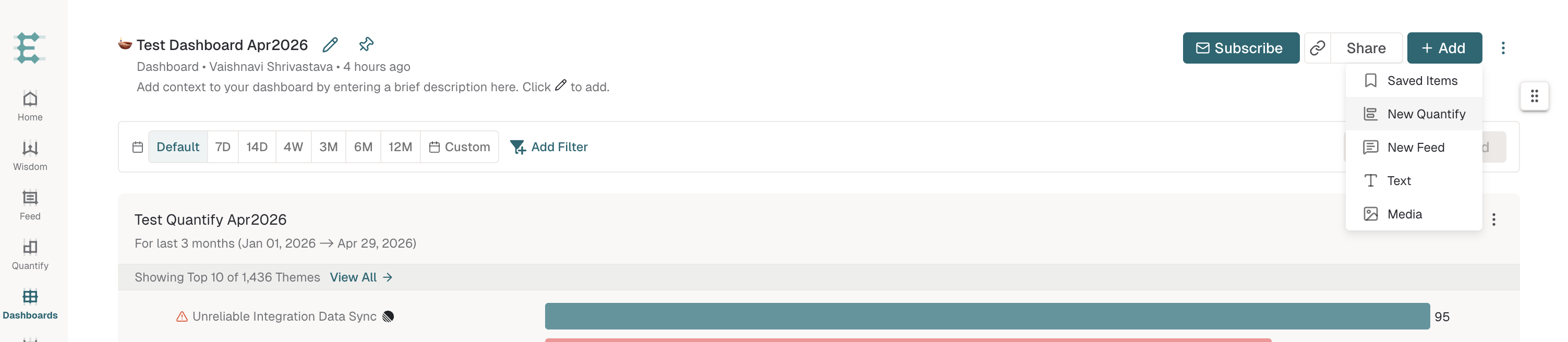
To add a Quantify to your Dashboard, open the Dashboard, click + Add in the top right, and select New Quantify to build one inline, or Saved Items to attach a Quantify you've already saved.
This guide uses Quantify for the saved chart analysis. Some older materials use the term Analysis.
Add a new Quantify to a Dashboard
To build a Quantify directly from your Dashboard:
Open the Dashboard where you want the Quantify to appear.
Click + Add in the top right.
Select New Quantify from the menu.
Configure your Quantify (metric, breakdown, filters, time range).
Save it. The Quantify is now part of the Dashboard.
Add an existing saved Quantify to a Dashboard
If you have a Quantify you've already saved and want to attach it to a Dashboard without rebuilding:
Open the Dashboard where you want the Quantify to appear.
Click + Add in the top right.
Select Saved Items from the menu.
Pick the Quantify you want from the list of saved items.
Create a New Dashboard
If you do not have an existing dashboard or wish to create a new one:
Select Create New Dashboard.
Enter a name for the Dashboard, then click Save.
Once the Dashboard is created, follow the steps above to add Quantifies.
Frequently asked questions
What's the difference between New Quantify and Saved Items?
New Quantify opens a blank Quantify builder so you can configure a fresh chart inline on the Dashboard. Saved Items lets you attach a Quantify you've already configured and saved, without rebuilding it.
Why is it called "Quantify" instead of "Analysis"?
Quantify is the product’s chart-analysis workflow. Older materials may call a saved Quantify an Analysis.
Can I add other items to a Dashboard besides Quantifies?
Yes. The + Add menu on a Dashboard also includes New Feed (a feed of feedback records), Text (a text block for context), and Media (images), in addition to Saved Items and New Quantify.
Can I move or copy a Quantify between Dashboards?
You can attach a saved Quantify to multiple Dashboards via + Add → Saved Items on each one.
Related articles
Sharing & Saving Quantify — covers the Quantify-side save flow in full detail.