
How AI credits work in Enterpret
Open Settings → Credits to check your AI credit balance and how many credits you’ve used.
How AI credits work
Your workspace can have personal allowances, an organization credit limit, and purchased top-ups. Check Settings → Credits and your workspace agreement for the balances and periods that apply:
Personal credits: Where configured, a personal allowance covers eligible Agent usage before usage draws from the organization pool. Check the allowance and reset date shown for your account; an allowance is not guaranteed for every workspace.
Organization credits: Eligible usage can draw from the organization’s configured pool. Its period can be a calendar period or a configured contract period. Check the displayed end date and your workspace agreement instead of assuming an annual reset or rollover.
Purchased top-up credits: A confirmed top-up increases the configured organization credit limit. Purchase terms, expiry, and any rollover follow your workspace agreement; do not assume a separate spending priority or indefinite availability.
For personally owned work, credits are used in this order:
Personal credits
Organization credits, including purchased top-up credits
Credit usage depends on the turns the Agent completes. Two similar requests may use different amounts of credits because their scope, source data, context, tools, output depth, or number of steps may differ.
Sessions and turns
An Agent Session is an interactive thread of work and may contain multiple turns.
An Automation session is one execution of an Automation and may also contain multiple turns.
A turn includes your message, the Agent’s work, and its response. Your next message starts a new turn.
The total credits used by an Enterpret Agent Session or Automation session reflect the completed work across all of its turns. A Session or turn is not a fixed number of credits.
What uses credits
Credits are charged for completed Agent work:
Activity | Credit treatment |
|---|---|
A completed turn within an Agent Session or Automation session | Uses credits based on the work completed |
Creating or refreshing a Live Artifact | Creating a Live Artifact uses credits. Manual and automatic refreshes currently use no additional credits, including refreshes of Agent-generated summaries. |
A completed personally owned Automation session | Uses personal credits first, followed by eligible organization credits |
Agent work launched by a Signal or Escalation | Detecting the trigger uses no credits. The Agent work it starts can use credits. Quality Monitor uses no credits when an investigation rules out a possible issue before the configured alert or action. See How Quality Monitor uses credits. |
Accessing Enterpret through MCP | Ask your Enterpret account team how your MCP connection is billed under your workspace agreement. |
Agent Sessions or Automations owned by an Enterpret employee, such as your CSM | Only usage classified as Enterpret-funded is excluded from customer-credit deductions; verify the recorded ownership and usage classification. |
Failed, cancelled, and retried work
If an Agent run fails before it delivers an answer, Enterpret credits back eligible model usage for that run. The adjustment can appear later. Work that already completed, such as generating a session title or performing a connector action, can still use credits.
If you cancel work before completion, you are charged for the turn.
A successful retry uses credits for its work. Eligible failed-run model usage is returned through settlement; separately completed work can remain charged.
A completed turn uses credits even if the answer was not useful. Contact your CSM or Enterpret Support if you believe usage was recorded incorrectly.
Work performed by Enterpret employees
Enterpret’s metering distinguishes customer-credit usage from staff support, product-feature, and development usage. Usage classified in an Enterpret-funded category does not deduct customer credits. Classification depends on the saved owner and execution context; a CSM helping with customer-owned work does not by itself establish an exemption. Ask your Enterpret team to verify unexpected charges.
X connector credits
X actions use credits in addition to Agent usage. A credit notice appears when you connect X.
How X credit usage is calculated
Credits depend on the action and the number of billable items. A single request to the Agent can run more than one X action.
X action | Charged per | Credits |
|---|---|---|
Read posts | Post returned | 0.1 |
Read users | User profile returned, including authors returned with posts | 0.2 |
Get recent post counts | Request | 0.1 |
Create a post without a URL | Post created | 0.3 |
Create a post with a URL | Post created | 4 |
For example, an action that returns three posts and two author profiles uses 0.7 X credits: (3 × 0.1) + (2 × 0.2).
Rejecting an approval before an X action runs or having the X action fail does not incur an X charge. A successful X action can still use credits if the Agent later fails to finish its response.
Total credits = Agent usage credits + X connector credits. To see your recorded usage, open Settings → Credits.
Adding credits
Only an Owner can purchase top-up credits. Admins and Users cannot purchase them.
A confirmed purchase raises the organization’s configured credit limit. Check the purchase confirmation and workspace agreement for expiry, renewal, and rollover terms.
There is no automatic top-up. An Owner must choose to purchase additional credits when they are needed.
Roles and permissions
Action | Owner | Admin | User |
|---|---|---|---|
View personal usage | Yes | Yes | Yes |
View organization and user usage for the current Enterpret organization | Yes | Yes | No |
Set or change a user-level credit limit | Yes | Yes | No |
Purchase top-up credits | Yes | No | No |
Manage Owners | Yes | No | No |
Manage users and Agent settings | Yes | Yes | No |
Owners have all Admin permissions and can purchase top-up credits and manage organization ownership.
Admins can manage users, Agent settings, and user-level credit limits, but cannot purchase credits or make themselves an Owner.
Users can review their own usage and limits.
User-level credit limits
Owners and Admins can set a monthly credit limit for an individual user. The limit applies across that user’s organization-funded usage.
A user can inherit the organization’s default limit, have a custom limit, or have no limit. After any available personal allowance, eligible work draws from available organization credits subject to that applicable limit. If a user-level limit is set, new turns and runs for the user’s affected Agent Sessions and personally owned Automations are blocked when that limit is reached, even if organization credits remain.
Example: For any user, personal credits are used first. Eligible usage then draws from the organization pool until the user reaches the monthly limit. The user’s affected Agent work stops at that limit unless an Owner or Admin raises it.
Expiration and rollover
Credit source | Where to check |
|---|---|
Personal allowance | Your allowance and reset date in Settings → Credits, where configured. |
Organization credits | The current organization limit and displayed period end; confirm entitlement in your workspace agreement. |
Purchased top-ups | Purchase confirmation and workspace agreement for expiry, renewal, and rollover. |
What happens when credits run out
Where enabled, usage warnings and notifications help users and administrators track limits. Enterpret does not automatically purchase top-ups. New work is checked against the applicable configured limits; work already in progress can finish. Check Settings → Credits rather than relying on a notification.
A user exhausts personal credits
After any personal allowance is exhausted, eligible work can use available organization credits subject to the user’s custom or inherited limit and the organization’s current credit period.
A user reaches a user-level limit
New turns and runs for that user’s affected Agent Sessions and personally owned Automations are blocked, even when organization credits remain. Work already in progress can finish. An Owner or Admin can raise the limit, or the user can wait for the monthly reset.
The organization exhausts its credits
Within an active credit period, users with an available personal allowance can continue eligible work until their applicable limit. An expired contract period or another access restriction can also block work; an exhausted pool and an expired period are different states.
An Owner can review the balance and purchase an available top-up. After credits and access are restored, check the affected automation’s state and manually retry or retrigger work as appropriate; missed work is not guaranteed to replay automatically.
Planning credit usage
To estimate credit usage, check what similar recent Sessions or automations used. The examples below show tasks you can ask Agent to do. Credit use depends on the work Agent completes.
Agent Session examples
Example | Sample request |
|---|---|
Focused question | What are the top billing complaints this month? |
Multi-step research | Compare complaint drivers by plan, enrich affected accounts, and recommend next steps. |
A Session may include several follow-up turns. Each completed turn contributes to the Session’s total credit usage, so a longer investigation can use more credits than its initial request suggests.
Agent Automation examples
Illustrative automation | Requested outcome |
|---|---|
Release Health | Compare post-release feedback with a pre-release baseline. |
Product Quality | Investigate recurring bugs and prepare tickets that link to the supporting feedback. |
Help Center Gaps and Deflection | Find recurring questions missing from existing content. |
Risk and Fraud Intelligence | Review feedback against defined risk signals and routing criteria. |
Support Performance | Review available support quality, CSAT, and QA evidence. |
Customer Escalations | Summarize escalation risks and list the customers who may need follow-up. |
An automation may use several turns to gather feedback, analyze it, and send a result. For planning, multiply the observed average credits of comparable runs by the number of runs you intend to schedule. Include follow-up turns and changes in scope; your actual usage can differ.
You can reduce unnecessary usage by narrowing a task’s scope, running Automations only as often as needed, selecting a lower-cost model when appropriate, reviewing early sessions, pausing Automations you no longer need, and avoiding unnecessary retries or regeneration.
View and manage credit usage
Open Settings → Credits to review and manage credit usage.
View monthly credit usage
The Credits page opens to the current month.
Click the displayed month and year to open the month selector. On the workspace overview, it’s beside Spends. On an individual usage page, it’s in the header.
Select an available month. To browse another year, click the year or use the arrows beside it. The earliest possible month is September 2026.
To return to current usage, click This month.
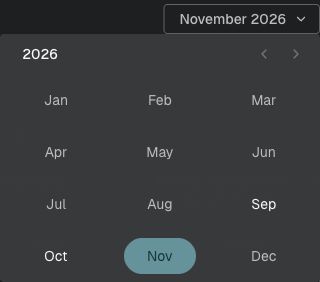

Credit usage is grouped by calendar month in UTC. In the individual usage view, you can see how much of the selected month’s usage came from personal and workspace credits.
On the workspace overview, usage reflects the selected month and the credit balance stays current.
Users
Users can review their personal usage, monthly limit, remaining credits, and reset date.
Owners and Admins
Owners and Admins can:
Review organization usage for the current Enterpret instance
Review usage by user, Agent Session, and Agent Automation
Identify users approaching or at their limits
Set or change user-level monthly limits
In the Credits usage tables, a lock marks a private automation. Owners and Admins can see its name and credit usage. Among workspace users, only its creator can open it from the table.
Owners can also add top-up credits and review credit purchases.
Organizations with multiple Enterpret instances
Settings → Credits reports the current Enterpret organization’s configured limits and usage. If your agreement covers multiple instances, ask your Enterpret team how credits are allocated; do not assume the product automatically shares a pool between instances.
Contact your Enterpret account team to confirm allocation changes allowed by your workspace agreement. The dashboard’s current-instance view does not establish a broader pooling or reallocation policy.
Frequently asked questions
When do AI credits reset?
Check the reset or end date in Settings → Credits. Personal allowances, where configured, use their configured period. Organization limits can follow calendar or contract periods; your workspace agreement determines the entitlement.
Do AI credits roll over?
Do not assume unused credits roll over. Check your workspace agreement and top-up confirmation for expiry, renewal, and rollover terms; the current displayed balance is not a promise about future periods.
Can I see how many credits a request will use before I run it?
No. Credit usage depends on the work the Agent completes, including the request’s scope, context, tools, source data, and output depth. Plan from comparable recent runs and review actual usage after the work completes.
Can I choose a model to manage credit usage?
Yes. When model selection is available for an Agent Session or Automation, you can choose from the models enabled for your organization. Models have different credit requirements, so selecting a lower-cost model can help reduce credit usage for routine work. More complex research or multi-step tasks may benefit from a more capable model. The final credit amount still depends on the work completed, not only on the model selected.
Is one Agent Session or Automation session equal to one credit?
No. A Session or Automation session may contain multiple turns, and each turn can require a different amount of work. Credits reflect the completed work across all turns, so usage varies by task and may vary between sessions of the same Automation.
Which credits are used first?
Where a personal allowance is configured, eligible work uses it before drawing from the organization pool. Applicable user and organization limits still apply. A top-up increases the configured organization limit; do not infer a separate priority between purchased and included balances from this guide.
Can an Admin purchase top-up credits?
No. Only an Owner can purchase top-up credits. Both Owners and Admins can manage user-level limits.
Are credits topped up automatically?
No. Enterpret does not automatically purchase or add credits. An Owner must choose to purchase a top-up.
Are Agent Sessions and Automation sessions run by Enterpret employees charged?
Usage recorded in an Enterpret-funded category does not deduct customer credits. This follows the saved ownership and execution context; the presence of an Enterpret employee alone does not guarantee an exemption. Ask your Enterpret team to verify the recorded classification.
How are top-ups billed?
Your workspace agreement sets when top-up invoices are issued and when payment is due. Ask your Owner or Enterpret account team for the purchase confirmation.
Why did the same Automation use a different number of credits this time?
The amount of source data, context, tool use, output depth, and number of steps can change between sessions. Credit usage reflects the work completed during each session.
How do credits work if my organization has multiple Enterpret instances?
Each instance shows that Enterpret organization’s configured usage and limits. Contact your Enterpret account team to confirm whether your agreement supports pooling or reallocation between instances.
Can credit usage change over time?
Usage can change with models, tools, task scope, and Agent efficiency. Consult current usage, your workspace agreement, and your Enterpret account team when planning a budget.
Who should I contact about incorrect usage or billing?
Contact your CSM or Enterpret Support over email or Slack. Include your organization, the date and time, the affected user, a link to the Agent Session or Automation, the behavior you expected, and any relevant invoice or purchase reference.