
Dynamic Taxonomy for Themes and Sub-Themes
Overview
Dynamic Taxonomy (DT) identifies recurring patterns in Miscellaneous or unclassified feedback and can add more specific themes and sub-themes. Matching historical feedback can then be classified against the updated taxonomy.
How it works
DT can run automatically for configured workspaces. The taxonomy editor’s weekly-update warning uses Saturday as the next update date. Confirm your workspace’s schedule with your Enterpret team.
During each run, DT analyses recent uncategorised feedback, identifies recurring patterns, and adds new theme and sub-theme nodes to your taxonomy where appropriate.
The update can move matching feedback out of Miscellaneous. Check Taxonomy → Activity log to see what the run changed.
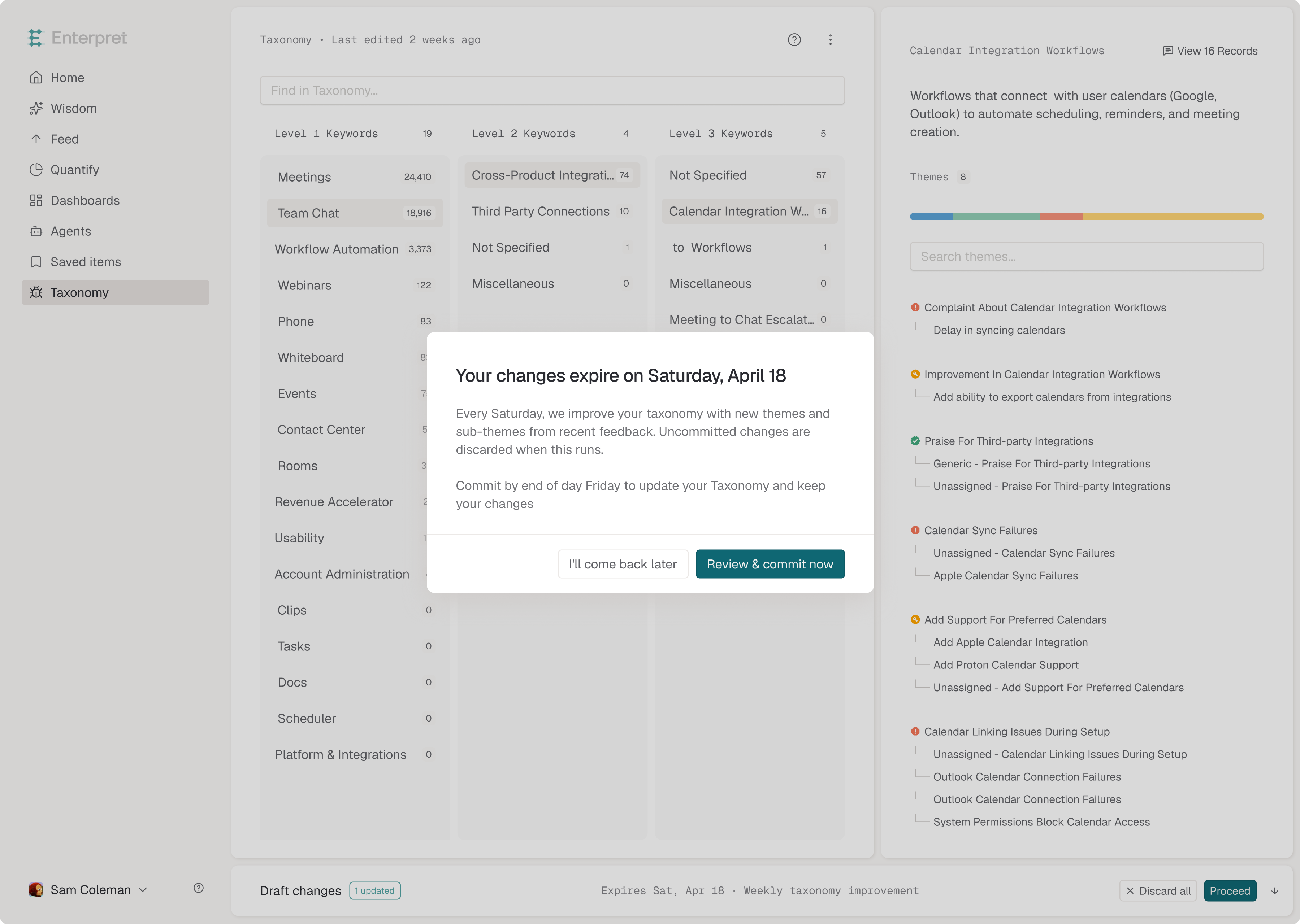
Important: taxonomy edit drafts
Where the taxonomy editor shows a weekly-update expiry warning, publish the draft before the displayed deadline. The warning states that uncommitted changes are discarded when the update runs.
Automatic taxonomy changes can make prepared work outdated. Review the expiry warning and coordinate with teammates before publishing.
Keep a record of changes you need to retain. If work has been discarded or made outdated, ask Enterpret Agent or your Enterpret team to review the current state before preparing it again.
Frequently asked questions
Do I need to turn Dynamic Taxonomy on?
DT may be configured to run automatically. Ask your Enterpret team to confirm whether it is active for your workspace.
Can I still edit the taxonomy manually?
Yes. Use Enterpret Agent to prepare, review, and publish changes. If an expiry warning is shown, publish work you want to keep before its deadline.
How often does DT run?
The weekly-update warning identifies Saturday. Check the displayed date and confirm the configured schedule with your Enterpret team.
Will DT remove themes or sub-themes I have created?
Dynamic Taxonomy is designed to add themes and sub-themes for recurring topics in Miscellaneous. Check Activity log to see what a specific run changed.
Where can I see what DT added in the last run?
Open Taxonomy → Activity log outside edit mode to review recorded updates and their status. Open an update for its details. For additional analysis, such as how much feedback moved out of Miscellaneous in a particular run, contact your Enterpret team.
If you have questions or notice anything unexpected after a Dynamic Taxonomy run, please reach out to us at support@enterpret.com or use the chat widget on enterpret.com.